Soundplant for Mac 43

1. Introduction
Live performance situations demand reliable, instant audio playback triggered with minimal latency. Soundplant for Mac transforms your computer keyboard into a versatile sample trigger, enabling real-time playback of sound effects, musical samples, backing tracks, and audio cues during performances, presentations, or productions. Whether you’re a DJ mixing sound effects into sets, theater technician cueing sound effects, podcaster triggering intro music and stingers, or musician layering samples into live performances, this software provides professional triggering capabilities without hardware samplers or complex DAW setups.
The application serves performers needing reliable live playback, sound designers managing effects libraries, content creators producing multimedia presentations, and anyone requiring instant audio triggering without technical complexity. By mapping audio files directly to keyboard keys, Soundplant delivers immediate playback control through familiar computer interaction.
2. Key Features and Capabilities
Keyboard Triggering: Assigns audio files to any keyboard key, creating an instantly playable soundboard accessible through simple keystrokes. This direct mapping enables fast, accurate triggering during live performances.
Unlimited Simultaneous Playback: Plays multiple audio files concurrently without conflicts, essential for layering sounds, overlapping effects, or triggering backing tracks while sound effects continue playing.
Low Latency Performance: Delivers near-instantaneous audio playback with minimal delay between keystroke and sound output, critical for live performance timing and rhythm accuracy.
Audio Format Support: Handles WAV, AIFF, MP3, AAC, and other common formats, eliminating conversion requirements for existing audio libraries.
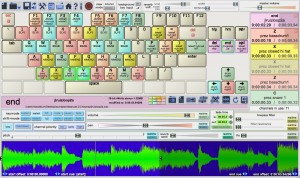
Visual Feedback: Displays which sounds are currently playing through on-screen visual indicators, helping performers track active samples during complex sequences.
3. Technical Specifications
| Specification | Details |
|---|---|
| Supported OS | macOS 10.9 or later |
| Audio Formats | WAV, AIFF, MP3, AAC, FLAC |
| Simultaneous Samples | Unlimited (system dependent) |
| RAM Requirements | Minimum 2GB (4GB+ recommended) |
4. Installation and Setup Process
Installation follows standard macOS procedures—download, mount the DMG, drag to Applications folder, and launch. The software requires approximately 20MB of disk space plus storage for audio samples you’ll be triggering.
Initial setup involves creating your first soundboard by dragging audio files onto keyboard key representations in the interface. The visual keyboard layout clearly shows which keys have samples assigned. Configuration options include setting default playback behavior, audio output routing, and latency optimization based on your audio interface capabilities.
5. User Interface and Workflow
The interface displays a visual representation of your keyboard with each key showing its assigned audio file name and playback status. Color coding indicates which samples are currently playing, which are loaded, and which keys remain unassigned. Controls for volume, pitch shifting, and loop settings appear alongside the keyboard display.
The workflow centers on preparation and performance. During setup, you drag audio files onto keys, configure playback properties, save the configuration as a bank, and load it when needed. During performance, simple keypresses trigger instant playback while visual feedback confirms activation. The straightforward approach minimizes technical barriers between intention and execution.
6. Performance and Reliability
Soundplant excels in live performance reliability with consistently low latency triggering. On properly configured systems, the delay between keystroke and audio output measures in milliseconds, essentially imperceptible during performance. The software efficiently manages system resources, with CPU usage remaining minimal even when triggering multiple simultaneous samples.
Memory usage scales with loaded sample count and file sizes. The software can load samples into RAM for zero-latency triggering or stream from disk to conserve memory, providing flexibility based on available system resources and sample library size. A typical setup with 50 loaded samples consumes 200-500MB RAM depending on audio file sizes.
The application demonstrates exceptional stability, running through extended performances without crashes or audio dropouts. Proper handling of audio buffer settings ensures glitch-free playback even under demanding conditions with multiple overlapping samples.
7. Comparison with Alternatives
| Feature | Soundplant | Ableton Live | QLab |
|---|---|---|---|
| Ease of Use | Very Simple | Complex | Moderate |
| Keyboard Triggering | Primary Function | Requires Setup | Supported |
| Learning Curve | Minutes | Weeks/Months | Days |
| Price | $85 | $99-749 | $0-399+ |
8. Practical Use Cases
Live DJ Performances: DJs trigger sound effects, air horns, vocal samples, and transition effects during sets, adding dynamic elements to mixes without interrupting music flow.
Theater Sound Design: Sound technicians cue door slams, phone rings, ambient sounds, and effects precisely timed with stage action, maintaining show flow without complex cueing systems.
Podcast Production: Podcasters trigger intro music, stingers, sound effects, and transition elements during recording, creating polished shows without extensive post-production editing.
Live Music Performance: Musicians layer backing tracks, percussion samples, and sound textures into performances, expanding sonic possibilities beyond their physical instruments.
9. Pricing and Value Proposition
Soundplant for Mac is available for a one-time purchase of $85, providing lifetime access with free updates. This perpetual license eliminates recurring subscription costs while delivering professional functionality. Educational pricing offers discounts for students and teachers.
A free version called Soundplant Basic provides limited functionality (10 samples maximum) for evaluation and casual use. This free tier allows comprehensive testing of core features before deciding whether the full version’s unlimited capabilities justify purchase.
Compared to comprehensive DAW software costing hundreds or thousands of dollars, Soundplant delivers focused sample triggering at accessible pricing. For users needing only reliable playback triggering without extensive production features, the focused approach provides better value than overpaying for unused capabilities.
10. Final Verdict
Soundplant for Mac succeeds as a specialized tool that does one thing exceptionally well—triggering audio samples with keyboard keys. The software excels through simplicity and reliability, prioritizing immediate functionality over complex features that create barriers to effective use.
The ultra-low latency performance meets professional requirements for live situations where timing matters, while unlimited simultaneous playback handles complex layering without restrictions. The straightforward interface enables productive use within minutes, avoiding lengthy learning curves that delay deployment.
We recommend Soundplant for performers needing reliable live audio triggering, sound designers managing effects libraries for theater or broadcast, content creators producing multimedia presentations, and musicians incorporating samples into performances. The focused functionality makes it ideal for users wanting excellent sample triggering without the complexity of full DAW software. The free Basic version provides ample opportunity to evaluate whether keyboard-based audio triggering suits your workflow before committing to purchase.
Developer:
Soundplant
Download Options
Download Soundplant for Mac 43
Download NowSafe & Secure
Verified and scanned for viruses
Regular Updates
Always get the latest version
24/7 Support
Help available when you need it
Pros & Cons Analysis
Pros
- Turns keyboard into sound trigger
- Low latency playback
- Performance tool
- Drag and drop sounds
- MIDI support
- Cue management
- Live performance ready
Cons
- Mac-only version
- Specific use case
- Audio hardware recommended
- Learning curve
- Limited editing features
- Niche application
System Requirements
- Windows 7 or later / macOS 10.12 or later
- 2 GB RAM minimum
- 500 MB available disk space
- Internet connection for updates