Windows Live Messenger

What is Windows Live Messenger?
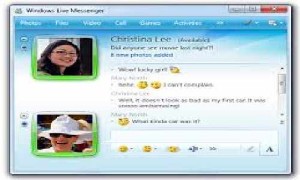
Windows Live Messenger, also known as MSN Messenger, was Microsoft’s instant messaging client that connected millions of users worldwide from 1999 to 2013. As part of the Windows Live suite of applications, it enabled real-time text conversations, file transfers, voice calls, video chat, and online gaming between users signed in with Microsoft accounts (formerly Windows Live ID or Hotmail accounts). At its peak in the late 2000s, Windows Live Messenger boasted over 300 million active users monthly, making it one of the world’s most popular communication platforms alongside AOL Instant Messenger and Yahoo! Messenger. The service featured emoticons, custom display pictures, personal messages, nudges, handwritten messages, and extensive customization options that defined a generation’s online communication experience. Microsoft discontinued Windows Live Messenger on April 8, 2013, migrating users to Skype, marking the end of an era in instant messaging history.
Key Features of Windows Live Messenger
Instant Messaging: Real-time text-based conversations with individual contacts or groups, supporting formatted text, emoticons, winks, and custom emoji. Users could see when contacts were typing and when messages were delivered and read.
Voice and Video Calling: Free voice calls and video conferencing between Messenger users anywhere in the world, requiring only webcam and microphone. Video quality improved significantly through versions, eventually supporting HD video calls.
File Sharing: Direct file transfers between users without email attachments, supporting any file type with size limits that increased over time. Shared folders allowed convenient file exchange between frequent contacts.
Custom Personalization: Extensive customization including custom display pictures, personal status messages, colored text, custom emoticons, animated backgrounds (using Messenger Plus! addon), and display name formatting with special characters and symbols.
Status and Presence: Rich presence system showing contact status as Online, Busy, Away, Be Right Back, On the Phone, Out to Lunch, or Invisible. Custom status messages let users share current activities, mood, or song lyrics.
Integration with Microsoft Services: Seamless integration with Hotmail email, Xbox Live gaming, Windows Media Player (sharing currently playing music), OneDrive (then SkyDrive) for file storage, and social networking features connecting to Facebook and MySpace.
Games and Activities: Built-in casual games and shared activities including tic-tac-toe, solitaire, and third-party games playable within conversation windows, fostering casual social gaming.
Mobile Access: Mobile versions for Windows Mobile, BlackBerry, iOS, and Android enabled messaging on-the-go, though with limited features compared to desktop client.
What’s New in Final Versions
Windows Live Messenger 2012: The final major version released in 2012 before discontinuation featured modernized Windows 8-style interface, improved integration with Microsoft account and SkyDrive, enhanced social networking feeds from Facebook and LinkedIn, better video call quality with HD support, and streamlined contact management.
Skype Integration Preparation: Later updates included hints of Skype integration as Microsoft prepared the transition, with messaging interoperability testing between Messenger and Skype networks.
Enhanced Security: Final versions improved security with better encryption for conversations, enhanced spam and phishing protection, and stricter contact verification to combat growing security threats.
Social Features: Enhanced social feed showing Facebook updates, photo sharing integration, and what contacts were listening to via Windows Media Player or other music services.
System Requirements (Final Version)
Operating System: Windows 7, Windows Vista SP2, Windows XP SP3 (32-bit and 64-bit). Windows 8 included messaging via built-in Messaging app integrating Messenger protocol.
Hardware: 1GHz processor minimum, 1GB RAM (2GB recommended for video calls), 200MB free hard drive space, internet connection (broadband recommended for video), webcam and microphone for video/voice calls, soundcard and speakers/headphones for audio.
Software Dependencies: Microsoft .NET Framework 3.5 or later, Windows Live ID (Microsoft account), Internet Explorer 7.0 or later for some features, Windows Media Player 10 or later for music sharing functionality.
Network Requirements: Broadband internet connection recommended (minimum 56K modem possible for text only), open ports for voice/video (typically TCP 1863, UDP 3478-3481), firewall configuration to allow Messenger connections.
Download and Installation Guide (Historical)
Note: Windows Live Messenger was officially discontinued in April 2013. This guide is historical; the service no longer functions as Microsoft shut down servers. Users should use Skype or Microsoft Teams for similar functionality.
Historical Installation Process: Visit download.live.com or microsoft.com/downloads, download Windows Live Essentials installer (included Messenger, Mail, Photo Gallery, Movie Maker), run installer and select Windows Live Messenger component, sign in with Windows Live ID or create new Microsoft account, customize privacy and notification settings, add contacts by email address or import from Hotmail address book.
Configuration: Set display picture and personal message, configure privacy settings for who can see status and contact you, adjust audio/video device settings for calls, customize notification sounds and alerts, install optional Messenger Plus! addon for enhanced features like custom emoticons and logging.
Windows Live Messenger vs Alternative Messaging Platforms
vs Skype (Its Replacement): Skype offered superior voice/video call quality and paid calling to regular phones. Messenger had lighter system requirements, better emoticon/personalization, and simpler interface for pure messaging. Skype emphasized professional communication; Messenger was more casual and social. Microsoft chose Skype’s infrastructure as the future.
vs AOL Instant Messenger (AIM): Both dominated 2000s instant messaging. AIM was more popular in North America, Messenger globally. Messenger offered video calling earlier and better Microsoft integration. AIM had buddy icons and away messages culture. Both discontinued around same period.
vs Yahoo! Messenger: Yahoo! Messenger offered similar features with voice, video, file transfer. Messenger had larger user base globally. Yahoo! Messenger included chat rooms (Messenger removed this feature). Both struggled against modern platforms and shut down (Yahoo! Messenger in 2018).
vs Modern Platforms (WhatsApp, Discord, Slack): Modern platforms are mobile-first, cloud-based, and cross-platform seamlessly. Messenger was desktop-focused with limited mobile. Modern apps offer better group chat, media sharing, and persistence. Messenger required both parties online; modern platforms work asynchronously. However, Messenger offered richer personalization and customization culture.
Pros and Cons
Advantages: Free messaging, voice, and video worldwide; simple, intuitive interface requiring minimal learning; extensive personalization and customization options; large user base ensuring most contacts were accessible; seamless integration with Hotmail and Microsoft services; lightweight resource usage compared to modern apps; rich emoticon and expression options; file sharing without size restrictions of email; offline message delivery when contacts came online; nostalgic, simple communication without algorithmic feeds or ads.
Disadvantages: Discontinued in 2013, completely non-functional today; required desktop installation unlike modern web-based apps; limited mobile functionality compared to dedicated mobile apps; security vulnerabilities exploited by spammers and phishing; messages not persistent, lost if not logged; no group conversation features in early versions; single-device limitation without message sync; Microsoft account required (privacy concerns for some); video call quality inferior to modern standards; proprietary protocol preventing third-party client innovation.
Who Should Use Windows Live Messenger (Historical Context)
Historical User Base: Windows Live Messenger was used by teenagers and young adults for casual social communication in the 2000s-early 2010s; families staying connected across distances with free video calls; international users avoiding expensive long-distance calls; students coordinating group projects and social plans; gaming communities coordinating multiplayer sessions; early remote workers for quick work communication; anyone with Hotmail email automatically had access.
Current Alternatives: Former Messenger users transitioned to Skype (Microsoft’s designated replacement), WhatsApp for mobile-first messaging, Discord for gaming and community communication, Slack or Microsoft Teams for professional use, Facebook Messenger (many Messenger users had Facebook integration), or Zoom for video conferencing.
Frequently Asked Questions
Q: Can I still use Windows Live Messenger today?
A: No, Microsoft officially shut down Windows Live Messenger service on April 8, 2013 (except China, which lasted until October 2014). The servers no longer exist, making the software completely non-functional. Users must migrate to alternatives like Skype, which Microsoft designated as Messenger’s replacement.
Q: How do I access my old Messenger conversation history?
A: If you enabled conversation logging in Messenger settings, logs were stored locally on your computer typically in “My Documents\\My Received Files” or “My Documents\\My Chat Logs.” Third-party tools like Messenger Plus! also created detailed logs. Without local logs, there’s no way to recover conversations as Microsoft didn’t store chat history server-side.
Q: What happened to my Messenger contacts?
A: Your Messenger contacts were tied to your Microsoft account. When signing into Skype with your Microsoft account, contacts should have migrated automatically. If you haven’t used Skype, your contacts still exist in your Microsoft account and should appear when you sign into Skype for the first time.
Q: Are there any working alternatives that recreate Messenger?
A: Some enthusiast projects attempted to recreate Messenger experience through reverse engineering (like MSN Messenger Reviver or Escargot project), but these are unofficial, limited in functionality, small user bases, and may have security concerns. Microsoft doesn’t support these efforts.
Q: Why did Microsoft kill Messenger for Skype?
A: After acquiring Skype in 2011 for $8.5 billion, Microsoft chose to consolidate messaging platforms. Skype had superior voice/video infrastructure, stronger brand recognition for calls, better mobile apps, and monetization through paid calling features. Maintaining two competing platforms was inefficient. The transition was completed by April 2013.
Q: What was Messenger Plus! and can I still use it?
A: Messenger Plus! was a popular third-party addon by Patchou that added custom emoticons, conversation logging, colored text, custom sounds, and many customization features. While the software exists, it’s useless without functional Messenger service. The developer created Plus! for Skype briefly but it’s also discontinued.
Final Verdict
Windows Live Messenger represents a significant chapter in internet communication history, defining how millions experienced online social interaction during the 2000s and early 2010s. The platform’s emphasis on personalization through custom display pictures, creative status messages, emoticons, and playful features like nudges created a distinct communication culture that modern platforms haven’t fully replicated. For users who lived through the Messenger era, it evokes nostalgia for simpler internet times when casual chat didn’t compete with social media feeds, advertising, or algorithmic manipulation.
The service’s strengths lay in its accessibility, simplicity, and seamless integration with Microsoft’s ecosystem. Free worldwide voice and video calling was revolutionary when long-distance calls cost money. The ability to see friends’ online presence and chat casually created always-on social connectivity that was novel for its time. File sharing, gaming, and music sharing features made conversations interactive beyond pure text.
However, Microsoft’s decision to discontinue Messenger in favor of Skype proved wise in hindsight. Messenger’s desktop-centric architecture couldn’t compete in the mobile-first era. The lack of message persistence, cloud sync, and true cross-platform functionality limited its evolution potential. Modern expectations for messaging—group chats, rich media, bots, encryption, integration with business tools—required infrastructure Messenger wasn’t designed to provide.
Today, Windows Live Messenger exists only in memories, archived conversations, and occasional screenshots shared nostalgically on social media. Its legacy lives on in how it normalized instant messaging as daily communication, pioneered free video calling mainstream adoption, and demonstrated the power of presence-based communication. While we cannot recommend using Messenger today (as it’s impossible), its historical importance deserves recognition. Former users seeking similar experiences should explore Skype for Microsoft ecosystem integration, WhatsApp or Telegram for mobile messaging, Discord for community communication, or any modern platform—all of which owe some debt to the foundations Messenger helped establish in making internet communication personal, immediate, and ubiquitous.
Download Options
Safe & Secure
Verified and scanned for viruses
Regular Updates
Always get the latest version
24/7 Support
Help available when you need it