SpyBHORemover

What is SpyBHORemover?
SpyBHORemover is a security utility that scans for and removes Browser Helper Objects (BHOs) installed in Internet Explorer. BHOs are small programs that load each time Internet Explorer starts, providing additional functionality like toolbars, search assistants, or browser enhancements. While legitimate BHOs add useful features, malicious BHOs can monitor browsing activity, display unwanted advertisements, redirect searches, or perform other unwanted actions. SpyBHORemover helps identify and remove problematic BHOs that may have installed without user knowledge.
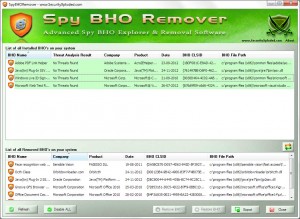
The application presents a list of all installed BHOs with information including name, file location, and publisher. Users can research unknown entries to determine whether they’re legitimate browser add-ons or potentially unwanted software. The removal function disables BHOs by modifying registry entries that trigger their loading, preventing them from running when Internet Explorer starts. For users experiencing browser hijacking, unwanted toolbars, or suspicious browser behavior, SpyBHORemover provides a focused tool for examining and cleaning browser extensions.
SpyBHORemover gained popularity during Internet Explorer’s dominance when BHOs were common vehicles for adware and browser hijackers. The tool provided visibility into software that traditional antivirus might not flag as malicious since many BHOs occupied a gray area between legitimate extensions and unwanted software. While less relevant today with Internet Explorer’s decline and modern browsers using different extension systems, SpyBHORemover remains useful for maintaining legacy systems still running Internet Explorer.
Key Features
- BHO Detection: Lists all Browser Helper Objects registered in Windows.
- BHO Information: Shows name, file path, and publisher for each entry.
- Removal Capability: Disables or removes problematic BHOs.
- Backup Creation: Saves registry entries before removal for recovery.
- Restore Function: Recover accidentally removed legitimate BHOs.
- No Installation: Portable operation, runs without setup.
- Simple Interface: Clear list view of all browser helper objects.
- Free Software: No cost for full functionality.
- Safe Operation: Non-destructive removal via registry modification.
Understanding Browser Helper Objects
Legitimate BHOs
- Adobe PDF Reader plugin
- Google Toolbar
- Antivirus browser protection
- Password manager integrations
- Developer tools
Potentially Unwanted BHOs
- Adware toolbars
- Search hijackers
- Browser spyware
- Unwanted shopping assistants
- Unknown toolbar add-ons
System Requirements
- Windows XP, Vista, 7, 8, 8.1, or 10
- Internet Explorer installed (any version)
- Administrator rights for removal operations
- Minimal disk space (portable application)
How to Use SpyBHORemover
- Download: Get SpyBHORemover from security software site.
- Run as Administrator: Right-click and run with elevated privileges.
- Review BHO List: Examine all listed Browser Helper Objects.
- Research Unknown Entries: Search online for unfamiliar BHO names.
- Select for Removal: Check boxes for BHOs to remove.
- Create Backup: Save backup before making changes.
- Remove Selected: Click remove to disable chosen BHOs.
- Restart Browser: Close and reopen Internet Explorer.
- Verify Results: Confirm problematic behavior resolved.
- Restore if Needed: Use backup to restore if legitimate BHO removed.
SpyBHORemover vs Alternatives
| Feature | SpyBHORemover | Autoruns | AdwCleaner |
|---|---|---|---|
| Focus | BHOs specifically | All startup items | Adware/PUPs |
| Scope | Internet Explorer only | System-wide | All browsers |
| Ease of Use | Very Easy | Technical | Easy |
| Current Relevance | Legacy systems | Still relevant | Very relevant |
| Best For | IE BHO issues | Advanced users | General malware cleanup |
Pros and Cons
Pros
- Focused Tool: Specifically targets BHO management.
- Simple Interface: Easy to understand and use.
- Portable: No installation required.
- Backup/Restore: Safe operation with recovery option.
- Free: No cost for functionality.
- Non-Destructive: Disables rather than deletes.
Cons
- IE Only: Doesn’t affect Chrome, Firefox, Edge extensions.
- Declining Relevance: IE usage has dropped dramatically.
- No Auto-Detection: User must identify malicious BHOs.
- Limited Updates: Tool development has slowed.
- Technical Knowledge: Requires understanding what BHOs are legitimate.
Frequently Asked Questions
Is SpyBHORemover still useful in 2024?
SpyBHORemover’s usefulness depends on your situation. If you maintain systems still using Internet Explorer (legacy business applications, older Windows), it remains relevant for managing BHOs. For modern browsers like Chrome, Firefox, or Edge, different tools are needed since they use different extension systems. Most users today don’t need BHO-specific tools.
Will this help with Chrome or Firefox problems?
No, SpyBHORemover specifically targets Internet Explorer Browser Helper Objects. Chrome extensions, Firefox add-ons, and Edge extensions use different technologies. Use browser-specific extension management (chrome://extensions, about:addons) or tools like AdwCleaner that support multiple browsers.
How do I know which BHOs are safe to remove?
Research each BHO name online before removal. Known publishers (Microsoft, Adobe, your antivirus vendor) typically indicate legitimate software. Unknown publishers, random-looking names, or BHOs you don’t remember installing warrant suspicion. When uncertain, search “[BHO name] virus” or “[BHO name] safe” for community knowledge.
Final Verdict
SpyBHORemover served an important role during Internet Explorer’s era of dominance, providing a focused tool for managing the Browser Helper Objects that were frequent vehicles for adware, toolbars, and browser hijackers. The simple interface made BHO management accessible to non-technical users who might otherwise struggle to identify why their browser behaved strangely. The backup and restore functionality ensured that accidental removal of legitimate extensions could be reversed.
However, Internet Explorer’s decline to minimal market share has reduced SpyBHORemover’s relevance for most users. Modern browsers use different extension architectures, and contemporary anti-malware tools like AdwCleaner or Malwarebytes handle browser threats across all major browsers. For users maintaining legacy Windows systems with Internet Explorer, SpyBHORemover remains a useful specialized tool. For everyone else, broader security tools provide more comprehensive protection against browser-based threats.
Download Options
Download SpyBHORemover
Download NowSafe & Secure
Verified and scanned for viruses
Regular Updates
Always get the latest version
24/7 Support
Help available when you need it