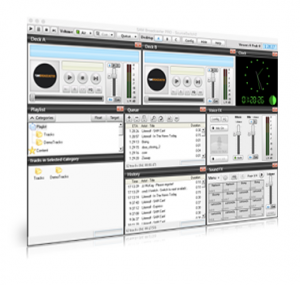
SAM Broadcaster Pro Mac Edition

1. Introduction
Professional internet radio broadcasting requires specialized software that handles audio mixing, stream encoding, playlist automation, and live DJ integration seamlessly. SAM Broadcaster Pro Mac Edition delivers comprehensive broadcasting capabilities for macOS, enabling radio stations and individual broadcasters to manage professional-quality streams. Whether operating a commercial internet station, community radio service, podcast network, or personal streaming channel, this software provides the tools needed for 24/7 operations with the reliability that audiences expect.
The application serves station managers coordinating multiple shows, DJs mixing live broadcasts, content creators building streaming channels, and organizations requiring professional radio automation. By combining automation with live performance capabilities and multi-format streaming, it addresses the complete workflow from content preparation through audience delivery.
2. Key Features and Capabilities
Multi-Encoder Streaming: Broadcasts simultaneously to unlimited servers in multiple formats including MP3, AAC, and Ogg Vorbis, ensuring compatibility across different listener platforms and bandwidth requirements.
Advanced Playlist Management: Creates sophisticated rotations with category-based scheduling, priority controls, and intelligent automation that maintains professional sound flow without repetition or dead air.
Live DJ Integration: Seamlessly switches between automated playlists and live performance, with crossfading, voice-over ducking, and gap elimination ensuring smooth transitions that maintain broadcast quality.
Audio Processing: Built-in equalizers, compressors, and limiters normalize audio levels across different sources, delivering consistent professional sound quality that meets broadcast standards.
Listener Statistics: Provides comprehensive analytics including peak listening times, geographic distribution, and listener retention, offering insights valuable for content planning and advertiser reporting.
3. Technical Specifications
| Specification | Details |
|---|---|
| Supported OS | macOS 10.13 or later |
| Encoding Formats | MP3, AAC, AAC+, Ogg Vorbis |
| Server Support | Shoutcast, Icecast, Live365 |
| RAM Requirements | Minimum 4GB (8GB recommended) |
4. Installation and Setup Process
Installation involves downloading the DMG file, mounting it, dragging the application to the Applications folder, and launching. The software requires approximately 150MB of disk space plus additional storage for music libraries and recording features.
Initial configuration includes setting up streaming server connections with host addresses, port numbers, and authentication credentials. The setup wizard guides through encoder configuration, audio device selection, and playlist database creation. For users broadcasting to Shoutcast or Icecast servers, preset configurations simplify the process significantly.
5. User Interface and Workflow
The interface presents a professional broadcast console with deck displays, playlist management, mixing controls, and stream monitoring. The main window organizes functions logically—decks for playback control, queue management for upcoming tracks, encoder status displays, and listener statistics panels.
Daily workflow involves playlist preparation, schedule configuration, stream activation, and monitoring. Automated operations handle routine broadcasting while the interface provides immediate access to manual controls for live interventions. The design balances automation convenience with hands-on control, supporting both fully automated and live-assist broadcasting styles.
6. Performance and Reliability
SAM Broadcaster Pro demonstrates robust performance appropriate for professional broadcasting. The software efficiently manages system resources, with typical CPU usage ranging from 10-20% depending on active encoder count and audio processing complexity. Memory usage remains stable during extended operations, typically consuming 300-600MB RAM.
Automatic reconnection features prove invaluable during network interruptions, attempting to restore streaming server connections automatically and logging events for review. This resilience minimizes broadcast downtime from temporary connectivity issues. Audio quality remains consistently high across different bitrates, with encoding algorithms producing clean output even at lower bitrates suitable for bandwidth-constrained listeners.
The software handles extended 24/7 operations reliably, with many stations reporting months of continuous uptime without crashes or significant issues. Proper configuration and regular maintenance ensure stable long-term performance.
7. Comparison with Alternatives
| Feature | SAM Broadcaster Pro | RadioDJ | Nicecast |
|---|---|---|---|
| Platform | macOS | Windows only | macOS |
| Audio Processing | Advanced Built-in | Basic | Limited |
| Automation | Full Scheduler | Advanced | None |
| Price | $299 | Free | Discontinued |
8. Practical Use Cases
Internet Radio Stations: Commercial and community stations maintain 24/7 broadcasts with multiple bitrate streams, automated rotations, and live DJ slots, serving audiences across time zones without constant manual oversight.
College Radio: Educational institutions train student broadcasters while maintaining professional station operations, with automation handling routine programming and live features enabling student shows and specialty content.
Podcast Networks: Content creators stream live podcast recordings to audiences, enabling real-time listener interaction while simultaneously recording for later distribution through podcast platforms.
Event Broadcasting: Conference organizers and event managers stream keynotes, panels, and presentations to remote audiences, with multi-server capability ensuring redundancy for critical broadcasts.
9. Pricing and Value Proposition
SAM Broadcaster Pro Mac Edition is available for $299 as a one-time purchase, including lifetime licensing and one year of free updates and support. After the initial year, optional support renewals are available for $99 annually, providing continued access to software updates and technical assistance.
A fully functional 14-day trial allows testing all features before purchase, providing adequate time to configure streaming servers, import music libraries, and evaluate the software under realistic broadcasting conditions.
Compared to the total cost of operating a radio station including hosting and bandwidth, the software represents a modest investment that significantly enhances operational capabilities. The reliability and professional features prevent costly downtime and technical issues that damage listener relationships and station reputation.
10. Final Verdict
SAM Broadcaster Pro Mac Edition stands as a comprehensive professional broadcasting solution that successfully balances power with usability for macOS users. The extensive feature set addresses virtually every need of modern internet broadcasters, from hobbyists running small stations to professionals managing commercial operations.
The software particularly excels in reliability and flexibility, with multi-server streaming capabilities providing redundancy and reach that free alternatives cannot match. Built-in audio processing and automation eliminate the need for additional software, simplifying workflows and reducing potential failure points.
We recommend SAM Broadcaster Pro Mac Edition for serious Mac-based internet radio broadcasters, stations seeking professional features with reliable performance, and content creators wanting automation without sacrificing live performance capabilities. The 14-day trial provides sufficient time to evaluate whether the software meets your specific broadcasting needs. For established broadcasters seeking to upgrade operations or newcomers wanting professional-grade tools from the start, this software delivers exceptional capabilities that will serve broadcasting needs for years.
Developer:
SAM Broadcaster Pro Mac Edition
Download Options
Download SAM Broadcaster Pro Mac Edition
Download NowSafe & Secure
Verified and scanned for viruses
Regular Updates
Always get the latest version
24/7 Support
Help available when you need it
Pros & Cons Analysis
Pros
- Internet radio automation
- Mac native version
- Stream to multiple servers
- DJ features
- Music scheduling
- Gap killer
- Professional broadcasting
Cons
- Mac-only edition
- Expensive license
- Complex setup
- Server costs additional
- Steep learning curve
- Resource intensive
System Requirements
- Windows 7 or later / macOS 10.12 or later
- 2 GB RAM minimum
- 500 MB available disk space
- Internet connection for updates