Proxy Switcher PRO

1. Introduction
Managing multiple proxy servers for privacy, testing, or accessing geo-restricted content typically requires manual configuration changes. Proxy Switcher PRO automates proxy management, enabling instant switching between proxy servers without navigating system settings. Whether testing websites from different locations, maintaining anonymity, or bypassing restrictions, this software streamlines proxy usage through automated switching and testing capabilities.
The application serves privacy-conscious users, web developers testing geo-targeting, SEO professionals checking regional search results, and users accessing region-locked content through automated proxy management.
2. Key Features
Automatic Proxy Discovery: Finds and tests thousands of free public proxies automatically, building usable proxy lists without manual searching.
One-Click Switching: Changes system proxy settings instantly through simple toolbar or hotkey activation, eliminating manual configuration.
Proxy Testing: Validates proxy speed, anonymity level, and functionality before use, ensuring reliable connections.
Country-Based Selection: Filters proxies by geographic location, enabling targeted access to region-specific content.
3. Technical Specifications
| Specification | Details |
|---|---|
| Supported OS | Windows 7/8/10/11 |
| Proxy Types | HTTP, HTTPS, SOCKS4, SOCKS5 |
| Proxy Sources | Auto-discovery, custom lists, manual entry |
4. Installation and Setup
Installation completes quickly through standard setup process. Initial configuration involves updating proxy lists and testing proxies to build working inventory.
5. User Interface and Workflow
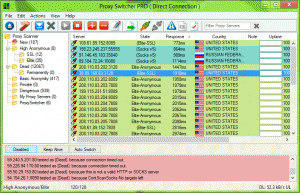
The interface displays proxy lists with country flags, speed indicators, and anonymity levels. Workflow involves selecting desired proxy characteristics, activating proxy with single click, and switching as needed.
6. Performance and Reliability
Proxy Switcher PRO efficiently manages proxy switching without system slowdowns. Proxy testing accurately identifies fast, working proxies, though free proxy reliability varies inherently.
7. Comparison with Alternatives
| Feature | Proxy Switcher PRO | Manual Config | VPN Services |
|---|---|---|---|
| Ease of Use | One-click | Complex | Simple |
| Cost | $39.95 (one-time) | Free | $5-15/month |
8. Practical Use Cases
Web Development Testing: Developers test geo-targeting and localization by accessing sites through proxies in target countries.
SEO Research: Professionals check search results from different regions, understanding how content ranks globally.
Privacy Protection: Users mask IP addresses when browsing, maintaining anonymity for sensitive research.
9. Pricing and Value Proposition
Proxy Switcher PRO costs $39.95 as one-time purchase providing lifetime access. A free version offers limited features. The one-time cost provides value compared to ongoing VPN subscriptions for users primarily needing proxy management.
10. Final Verdict
Proxy Switcher PRO successfully simplifies proxy management through automated discovery, testing, and switching. The software excels by removing technical barriers to proxy usage.
We recommend Proxy Switcher PRO for users frequently switching proxies for testing, research, or privacy. The automated proxy management justifies the cost for professionals requiring regular proxy usage without VPN subscription expenses.
Developer:
Proxy Switcher PRO
Download Options
Download Proxy Switcher PRO
Download NowSafe & Secure
Verified and scanned for viruses
Regular Updates
Always get the latest version
24/7 Support
Help available when you need it
Pros & Cons Analysis
Pros
- Manages multiple proxies
- Quick proxy switching
- Proxy testing built-in
- Download proxy lists
- Browser integration
- Anonymous browsing
- Profile management
Cons
- Windows-only tool
- Subscription required
- Proxy quality varies
- Technical knowledge helpful
- Some proxies unreliable
- Speed depends on proxy
System Requirements
- Windows 7 or later / macOS 10.12 or later
- 2 GB RAM minimum
- 500 MB available disk space
- Internet connection for updates