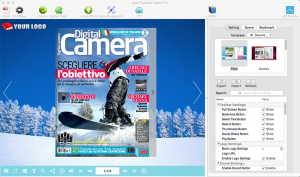
Next FlipBook Maker Pro for Mac

1. Introduction
Traditional PDF documents serve their purpose but lack the engaging presentation qualities that digital publications demand. Next FlipBook Maker Pro for Mac transforms static PDFs into interactive digital publications with realistic page-turning effects, multimedia integration, and mobile-friendly output. Whether creating digital magazines, product catalogs, portfolios, or marketing brochures, this software delivers professional flipbook presentations that capture attention and enhance reader engagement beyond conventional PDF viewing.
The application serves publishers transitioning to digital formats, marketers creating interactive sales materials, educators developing engaging course content, and creative professionals showcasing work through compelling digital portfolios. By combining ease of use with professional output quality, the software makes sophisticated digital publishing accessible without requiring programming or design expertise.
2. Key Features and Capabilities
Realistic Page Flip Animation: Creates smooth, natural page-turning effects that mimic physical publications, providing familiar reading experiences that engage users more effectively than scrolling PDFs.
Multimedia Integration: Embeds video, audio, image galleries, and hyperlinks directly into pages, transforming static content into interactive multimedia experiences that enhance message delivery and reader engagement.
Responsive HTML5 Output: Generates publications that work seamlessly across devices—desktops, tablets, and smartphones—without requiring readers to install special software or plugins.
Customizable Templates: Includes professionally designed themes and templates with customizable colors, backgrounds, and navigation controls, enabling branded publications that match corporate identities.
Multiple Publishing Options: Exports to HTML5 for web hosting, standalone EXE/APP files for offline distribution, or mobile apps for iOS/Android, providing flexibility for different distribution requirements.
3. Technical Specifications
| Specification | Details |
|---|---|
| Supported OS | macOS 10.12 or later |
| Input Format | PDF (any version) |
| Output Formats | HTML5, Mac App, WordPress Plugin |
| RAM Requirements | Minimum 4GB (8GB recommended) |
4. Installation and Setup Process
Installation follows standard macOS procedures—download the DMG file, mount it, drag the application to the Applications folder, and launch. The software requires approximately 200MB of disk space plus additional space for generated flipbooks based on source PDF sizes and multimedia content.
Initial setup involves minimal configuration. Import a PDF, select a template, customize appearance if desired, and publish. The streamlined workflow allows creating basic flipbooks within minutes, while advanced features remain accessible for customization as skills develop.
5. User Interface and Workflow
The interface uses a project-based workflow with clear steps: Import, Design, Customize, and Publish. The left panel displays page thumbnails for navigation, the center shows the editing canvas with the current page, and the right panel contains property editors for selected elements.
Creating flipbooks involves importing PDF files, selecting templates or starting from scratch, adding interactive elements like videos or links to specific pages, customizing navigation and branding, and publishing to desired output format. Real-time preview shows exactly how the final flipbook will appear and behave, eliminating surprises in published output.
6. Performance and Reliability
Next FlipBook Maker Pro handles PDFs of various sizes efficiently. A typical 50-page catalog imports and converts within 2-3 minutes on modern Macs, with processing time scaling based on page count, image resolution, and compression settings. The software maintains good responsiveness during editing operations, though complex documents with numerous embedded multimedia elements may experience occasional lag.
Published HTML5 flipbooks perform well across devices and browsers, with smooth page animations even on modest hardware. File sizes remain reasonable through intelligent optimization, with a 50-page magazine typically outputting to 10-20MB depending on image quality settings and embedded media.
The application demonstrates stability through extended use, properly handling large PDFs without crashes. Auto-save functionality protects work from unexpected interruptions, while project files remain compact for easy backup and transfer.
7. Comparison with Alternatives
| Feature | Next FlipBook Maker Pro | FlippingBook | Issuu |
|---|---|---|---|
| Hosting | Self-hosted | Cloud/Self-hosted | Cloud only |
| Multimedia Support | Full (Video, Audio) | Full | Limited |
| Pricing Model | One-time ($199) | Subscription ($348/year) | Subscription ($19-59/month) |
| Branding | Fully Customizable | Customizable | Limited (Free tier branded) |
8. Practical Use Cases
Marketing Collateral: Companies create interactive product catalogs with embedded videos demonstrating features, hyperlinks to product pages, and multimedia content that engages prospects more effectively than static PDFs.
Digital Publishing: Publishers convert magazines and newsletters to engaging digital editions with multimedia enhancements, reaching audiences preferring digital content while reducing printing and distribution costs.
Educational Materials: Educators develop interactive textbooks and course materials with embedded explanatory videos, audio narration, and supplementary resources accessible through hyperlinks.
Portfolio Presentation: Creative professionals showcase work through interactive portfolios with project videos, client testimonials, and direct links to live work examples, creating memorable presentations for prospective clients.
9. Pricing and Value Proposition
Next FlipBook Maker Pro for Mac is available for a one-time purchase of $199, providing lifetime access with free minor updates. Major version upgrades are available at discounted prices for existing customers. This perpetual licensing model contrasts favorably with subscription-based alternatives charging annually or monthly.
A fully functional trial version allows creating flipbooks with a watermark, enabling complete evaluation of features and workflow before purchase. The trial has no time limit, allowing thorough testing with actual content and use cases.
For organizations regularly producing digital publications, the one-time cost pays for itself quickly compared to monthly subscription services. The self-hosting capability eliminates ongoing hosting fees while maintaining complete control over content, an important consideration for sensitive materials or organizations with strict data policies.
10. Final Verdict
Next FlipBook Maker Pro for Mac successfully delivers professional digital publishing capabilities through an accessible interface that makes sophisticated flipbook creation achievable without technical expertise. The software excels through its balance of ease of use and feature depth, serving both beginners needing quick results and advanced users requiring extensive customization.
The HTML5 output ensures broad compatibility across devices and platforms, while multimedia integration capabilities transform static PDFs into engaging interactive experiences. The one-time purchase model provides excellent long-term value compared to subscription alternatives, particularly for regular users.
We recommend Next FlipBook Maker Pro for Mac users regularly creating digital publications, marketing professionals developing interactive sales materials, educators producing engaging course content, and creative professionals showcasing portfolios. The self-hosting capability appeals to organizations prioritizing content control and avoiding recurring costs. The unlimited trial with watermark provides ample opportunity to evaluate whether flipbook presentations align with your communication goals and whether the software’s workflow suits your needs.
Developer:
Next FlipBook Maker Pro
Download Options
Download Next FlipBook Maker Pro for Mac
Download NowSafe & Secure
Verified and scanned for viruses
Regular Updates
Always get the latest version
24/7 Support
Help available when you need it
Pros & Cons Analysis
Pros
- Creates digital flipbooks
- Page turning effects
- Embed multimedia
- Mobile-friendly output
- Template library
- Batch creation
- Interactive elements
Cons
- Mac-only software
- Paid application
- Learning curve
- Large output files
- Templates may look dated
- Limited customization without design skills
System Requirements
- Windows 7 or later / macOS 10.12 or later
- 2 GB RAM minimum
- 500 MB available disk space
- Internet connection for updates