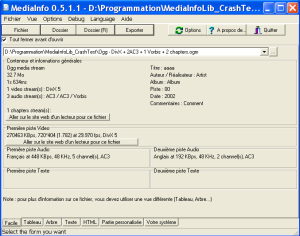
MediaInfo

What is MediaInfo?
MediaInfo is a free, open-source technical metadata analyzer that provides comprehensive information about audio and video files. Developed by MediaArea, this essential utility reveals hidden details within media containers including codec specifications, bitrate measurements, resolution data, frame rates, audio channels, sample rates, and encoding parameters that media players typically hide from users. Supporting over 100 container formats including MKV, AVI, MP4, MOV, WMV, FLV, WebM, and dozens more, MediaInfo has become the standard tool for video professionals, content creators, and anyone who needs to understand exactly what is inside their media files before transcoding, uploading, or archiving.
The software addresses a fundamental problem in digital media: file extensions and player displays often mislead users about actual content specifications. An MP4 file might contain H.264 or HEVC video, AAC or AC3 audio, and various subtitle formats—information critical when uploading to platforms with specific requirements or troubleshooting playback issues. MediaInfo extracts this data directly from file headers and streams, presenting it in customizable formats including tree view, text, HTML, XML, and JSON. Video editors verify source footage compatibility, uploaders check platform requirements, archivists document collections, and troubleshooters diagnose why files won’t play—all rely on MediaInfo’s accurate technical analysis.
Key Features
- Container Format Analysis: Reads MKV, AVI, MP4, MOV, WMV, FLV, WebM, MPEG-TS, and 100+ formats revealing all embedded streams.
- Video Stream Details: Displays codec (H.264, HEVC, VP9, AV1), resolution, bitrate, frame rate, aspect ratio, color space, and HDR metadata.
- Audio Stream Information: Shows codec (AAC, FLAC, DTS, AC3), channels, sample rate, bit depth, and language tags for multiple audio tracks.
- Subtitle Track Detection: Identifies embedded subtitles including SRT, ASS, PGS formats with language information.
- Chapter Information: Reveals chapter markers with timestamps and titles for navigation-enabled files.
- Multiple Output Formats: Export as text, HTML, XML, JSON, or custom templates for documentation and automation.
- Batch Processing: Analyze entire folders of media files generating reports for cataloging projects.
- Shell Integration: Right-click context menu in Windows Explorer for instant file analysis.
- Portable Version: Run from USB drive without installation for use on any Windows computer.
- Cross-Platform: Available for Windows, macOS, and Linux with consistent functionality.
What’s New in MediaInfo 2024/2025
- AV1 Codec Support: Full analysis of AV1-encoded video including HDR10+ metadata.
- Dolby Vision Detection: Identifies Dolby Vision profiles and compatibility layers.
- HEVC Improvements: Better parsing of HEVC streams with HDR metadata extraction.
- New Container Support: Added formats including AVIF images and updated MKV specifications.
- Performance Optimization: Faster analysis of large files and batch operations.
- UI Improvements: Updated interface with better dark mode support.
- API Updates: Enhanced library for developers integrating MediaInfo into applications.
System Requirements
Windows
- Windows 7, 8, 10, or 11 (32-bit and 64-bit)
- Minimal CPU requirements – runs on any modern processor
- 50 MB available disk space
- No additional runtime dependencies
macOS
- macOS 10.10 Yosemite or later
- Intel and Apple Silicon (M1/M2/M3) native support
- 50 MB available disk space
Linux
- Most distributions supported via packages or AppImage
- GTK or Qt interface depending on package
- Command-line version available for servers
How to Use MediaInfo
- Download and Install: Get MediaInfo from mediaarea.net – choose GUI version for visual interface or CLI for scripts.
- Open Media File: Drag file onto MediaInfo window, use File > Open, or right-click file in Explorer and select MediaInfo.
- View Basic Information: Default view shows essential details – container, video codec, resolution, audio format.
- Switch to Tree View: View > Tree displays hierarchical breakdown of all streams and properties.
- Export Report: File > Export generates text, HTML, or XML report for documentation.
- Batch Analyze: File > Open Folder to analyze all media files in directory.
- Compare Files: Open multiple files to compare specifications side-by-side.
- Customize Display: Options > Preferences to configure which fields display and output format.
MediaInfo vs Alternatives
| Feature | MediaInfo | FFprobe | VLC Media Info |
|---|---|---|---|
| Price | Free, Open Source | Free, Open Source | Free, Open Source |
| GUI Interface | Yes (excellent) | No (CLI only) | Basic |
| Detail Level | Very Detailed | Very Detailed | Basic |
| Export Options | Text, HTML, XML, JSON | JSON, XML | None |
| Best For | General users, professionals | Scripts, automation | Quick checks |
Pros and Cons
Pros
- Comprehensive Analysis: Reveals more technical details than any competitor including HDR metadata and chapter information.
- Format Support: Handles virtually every audio/video format including obscure and legacy containers.
- Multiple Interfaces: GUI for casual use, CLI for automation, library for developers.
- Completely Free: No ads, no premium version, no limitations on features or file sizes.
- Portable Option: Run without installation from USB drive on any computer.
- Regular Updates: Actively maintained with new codec and format support.
- Lightweight: Small download, minimal resource usage, instant startup.
Cons
- Technical Output: Information displayed assumes familiarity with media terminology.
- No Editing: Analysis only – cannot modify metadata or transcode files.
- Interface Dated: GUI functional but not modern looking.
Who Should Use MediaInfo?
- Video Editors: Verify source footage specifications before importing into editing software.
- Content Uploaders: Check file compatibility with YouTube, Vimeo, or other platform requirements.
- Media Archivists: Document collections with detailed technical specifications.
- Troubleshooters: Diagnose why videos won’t play or have audio/sync issues.
- Developers: Integrate MediaInfo library into media applications.
- Quality Checkers: Verify encoding output matches specifications.
Frequently Asked Questions
Is MediaInfo really free?
Yes, MediaInfo is completely free and open-source under BSD license. There are no paid versions, no feature limitations, no file size restrictions, and no ads. The project is supported by donations and MediaArea’s commercial products. You can use MediaInfo for personal or commercial purposes without cost.
Can MediaInfo edit video metadata?
No, MediaInfo is read-only – it analyzes and displays information but cannot modify files. For editing metadata, use tools like MKVToolNix for MKV files, MP3Tag for audio, or FFmpeg for general video metadata manipulation.
Why does MediaInfo show different bitrate than my encoder?
MediaInfo calculates actual bitrate from file size and duration, while encoders show target or average bitrate. Variable bitrate (VBR) encoding means actual bitrate fluctuates. MediaInfo’s measurement reflects what’s actually in the file.
Final Verdict
MediaInfo is an indispensable utility for anyone working with digital media files. Its ability to reveal comprehensive technical specifications hidden within video and audio containers solves countless problems – from verifying encoder output to diagnosing playback issues to documenting media archives. The combination of exhaustive format support, multiple output options, cross-platform availability, and completely free licensing makes MediaInfo the definitive choice for media file analysis. Whether you’re a professional video editor needing to verify footage specifications or a casual user wondering why a video won’t play, MediaInfo provides answers no other tool matches.
Developer:
distribution.
Download Options
Safe & Secure
Verified and scanned for viruses
Regular Updates
Always get the latest version
24/7 Support
Help available when you need it