Macsome Audio Recorder

1. Introduction
Capturing audio from streaming services, online radio, video calls, and system sounds requires specialized recording software that Mac’s built-in tools don’t adequately provide. Macsome Audio Recorder delivers comprehensive audio capture capabilities for macOS, recording any sound playing through your system or input devices while maintaining quality. Whether archiving streaming music, recording podcast interviews, capturing webinar audio, or preserving online radio broadcasts, this tool provides reliable recording without the complexity of professional audio production software.
The application serves content creators recording source material, researchers capturing interviews and presentations, music enthusiasts preserving streaming performances, and anyone needing to record computer audio for legitimate personal use. By combining ease of use with professional recording quality, it makes audio capture accessible without requiring audio engineering expertise.
2. Key Features and Capabilities
System Audio Recording: Captures all audio playing through your Mac including streaming services, browser audio, application sounds, and system notifications. This internal recording eliminates quality loss from re-recording through microphones.
Microphone Input: Records from built-in or external microphones for voiceovers, podcasting, and interviews. Simultaneous system and microphone recording enables capturing both computer playback and live commentary together.
Multiple Format Support: Outputs recordings in MP3, AAC, FLAC, and WAV formats with configurable quality settings, balancing file size against audio fidelity based on intended use.
Scheduled Recording: Automatesrecording sessions by scheduling start and stop times, enabling unattended capture of radio broadcasts, webinars, or other time-specific audio content.
ID3 Tag Editor: Adds metadata including title, artist, album, and artwork to recordings, organizing captured audio into properly tagged music libraries for easy management and playback.
3. Technical Specifications
| Specification | Details |
|---|---|
| Supported OS | macOS 10.11 or later |
| Output Formats | MP3, AAC, FLAC, WAV |
| Recording Sources | System audio, microphone, both simultaneously |
| RAM Requirements | Minimum 2GB |
4. Installation and Setup Process
Installation follows standard macOS procedures—download the DMG file, mount it, drag the application to your Applications folder, and launch. The software requires approximately 50MB disk space plus additional storage for recordings based on duration and quality settings.
Initial setup may require installing a virtual audio driver for system audio capture, a one-time process guided by clear instructions. This driver creates a virtual audio device that captures system sounds without affecting normal audio playback. Once installed, configuration involves selecting audio sources, choosing output format and quality, and setting the destination folder for recordings.
5. User Interface and Workflow
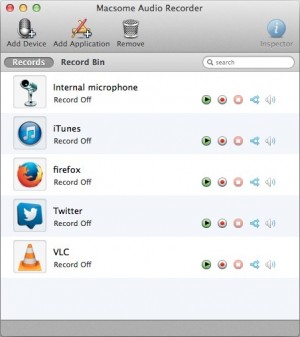
The interface emphasizes simplicity with a clean, uncluttered design. The main window displays source selection, format options, recording controls, and a waveform visualization showing audio levels during recording. Large, clearly-labeled buttons make core functions immediately accessible.
Typical workflow involves selecting audio source (system audio, microphone, or both), choosing output format and quality, clicking record, playing the audio you want to capture, and clicking stop when finished. Recordings automatically save to the designated folder with optional metadata editing before finalizing. The straightforward process makes recording accessible even for users unfamiliar with audio software.
6. Performance and Reliability
Macsome Audio Recorder demonstrates efficient performance with minimal system impact. CPU usage typically remains under 10% during recording, allowing concurrent computer use without noticeable slowdown. Memory consumption stays modest at 100-200MB regardless of recording duration, as audio streams directly to disk rather than buffering in RAM.
Recording quality matches source material faithfully without introducing compression artifacts or quality degradation. The software maintains proper synchronization throughout long recordings, avoiding audio drift or dropouts that plague less sophisticated tools. File sizes remain reasonable through intelligent encoding—a one-hour recording at 256kbps MP3 quality consumes approximately 115MB.
The application handles extended recording sessions reliably, successfully capturing multi-hour broadcasts without crashes or corruption. Auto-resume functionality protects against unexpected interruptions, while proper error handling manages issues like full disks gracefully without losing captured audio.
7. Comparison with Alternatives
| Feature | Macsome Audio Recorder | Audio Hijack | QuickTime |
|---|---|---|---|
| System Audio | Yes (Built-in) | Yes (Advanced) | No (Requires workarounds) |
| Scheduled Recording | Yes | Yes | No |
| Format Options | MP3, AAC, FLAC, WAV | Extensive | M4A only |
| Price | $39.95 | $64 | Free (macOS) |
8. Practical Use Cases
Streaming Music Archival: Users record live streaming concerts, DJ sets, and exclusive online performances for personal libraries, capturing content that may not be available for download or purchase.
Podcast Production: Content creators record Skype interviews, online panel discussions, and remote guest appearances, capturing both sides of conversations for podcast episodes.
Educational Content: Students and professionals record webinars, online lectures, and training sessions for later review and reference, ensuring they don’t miss important information.
Radio Broadcasting: Enthusiasts capture internet radio shows, international broadcasts, and specialty programming for time-shifted listening or archival purposes.
9. Pricing and Value Proposition
Macsome Audio Recorder is available for a one-time purchase of $39.95 for a single-user license, providing lifetime access with free updates for the current major version. Family licenses covering three Macs are available for $59.95, offering value for multi-computer households.
A free trial version allows recording files up to three minutes in length, enabling functional testing with actual use cases before purchase. This limitation-free trial on short recordings helps verify the software meets your recording needs and works with your specific audio sources.
Compared to professional audio software costing hundreds of dollars or requiring subscriptions, Macsome Audio Recorder provides focused recording functionality at accessible pricing. The one-time cost makes it economical for casual users while delivering sufficient capabilities for regular recording needs.
10. Final Verdict
Macsome Audio Recorder successfully delivers reliable Mac audio recording through a straightforward interface that prioritizes ease of use without sacrificing essential features. The software excels by focusing on doing audio recording well rather than attempting to be a comprehensive audio production suite.
The system audio capture capability works reliably without complicated configuration, while scheduled recording and multiple format support add valuable flexibility. Recording quality remains faithful to source material, and performance proves efficient enough for extended recording sessions.
We recommend Macsome Audio Recorder for Mac users needing regular audio recording capabilities, particularly those capturing streaming content, recording online meetings and webinars, or archiving internet radio broadcasts. The straightforward interface makes it accessible to non-technical users while the reliable performance satisfies regular use. The trial version with three-minute limitation provides adequate opportunity to verify the software works with your specific recording needs before purchase.
Developer:
Macsome Audio Recorder
Download Options
Safe & Secure
Verified and scanned for viruses
Regular Updates
Always get the latest version
24/7 Support
Help available when you need it
Pros & Cons Analysis
Pros
- Records audio from any Mac application
- Captures streaming music
- Splits recordings by silence
- Supports multiple output formats
- Schedule recording feature
- ID3 tag editing
- Simple interface
Cons
- Mac-only application
- Recording copyrighted content may be illegal
- Requires audio routing setup
- Limited editing capabilities
- Paid software after trial
- Can miss audio if misconfigured
System Requirements
- Windows 10 or later / macOS 10.15+
- 4 GB RAM recommended
- 350 MB available disk space
- Internet connection required