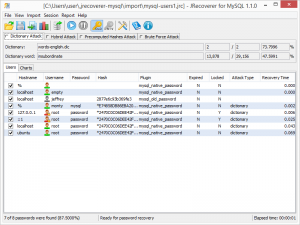
JRecoverer for MySQL Passwords

What is JRecoverer for MySQL Passwords
JRecoverer for MySQL Passwords is a user account password auditing and recovery tool developed by LCPSoft for MySQL databases. This cross-platform application enables database administrators to recover lost or forgotten MySQL user account passwords and audit password security. The software supports various MySQL versions including MySQL 8.0, offering multiple recovery methods to handle different password complexity scenarios.
Key Features
- Cross-Platform Compatibility: Works across Windows, macOS, and Linux operating systems.
- Multiple Recovery Methods: Supports dictionary attacks, brute force attacks, hybrid dictionary/brute force attacks, and precomputed hashes attacks.
- MySQL 8.0 Support: Fully compatible with MySQL 8.0 and earlier versions.
- Flexible Account Import: Import account information directly from MySQL database or from a text file.
- Enhanced Performance: Speed increases for dictionary and hybrid attacks.
- Security Auditing: Test password strength to identify weak passwords.
What’s New in Latest Version
Version 1.5.0, released in January 2023, brings MySQL 8.0 support, ensuring compatibility with the latest MySQL releases. Performance improvements for dictionary and hybrid attacks result in faster password recovery times. The update includes stability improvements and bug fixes to enhance overall reliability during password recovery operations.
System Requirements
- Operating System: Windows 10/11, macOS 10.12 or later, or Linux distributions
- Processor: Intel or AMD processor, 1 GHz or faster
- RAM: Minimum 2 GB (4 GB recommended)
- Hard Disk Space: At least 100 MB of free space
- MySQL: Compatible with MySQL 5.x, MySQL 8.0, and other versions
- Network: Network connectivity for remote MySQL server access
- Permissions: Appropriate database permissions to access account information
How to Download and Get Started
Download JRecoverer for MySQL Passwords from the official LCPSoft website or trusted software distribution platforms. The software is available as shareware for evaluation before purchase. After downloading, install the application following standard installation procedures for your operating system.
To begin, launch the application and choose your account import method. Connect directly to your MySQL database server by providing connection credentials, or import account information from a text file. Once accounts are loaded, select the users whose passwords you need to recover. Choose your preferred recovery method: dictionary attacks for common passwords, brute force for systematic checking, hybrid for combined approaches, or precomputed hashes for faster results. The software will process the recovery and display results.
JRecoverer for MySQL Passwords vs Alternatives
Compared to other MySQL password recovery solutions, JRecoverer stands out for its cross-platform functionality on Windows, macOS, and Linux. This is a significant advantage over platform-specific tools. Compared to free alternatives like MySQL Password Auditor by SecurityXploded, JRecoverer offers professional support and regular updates including MySQL 8.0 compatibility.
The JRecoverer Database Bundle supports MySQL, Oracle Database, PostgreSQL, and Microsoft SQL Server in a single package, making it more cost-effective for organizations managing multiple database platforms. While specialized MySQL-only tools might offer deeper integration, JRecoverer’s broad platform support and multiple attack methods make it versatile for most password recovery scenarios.
Pros and Cons
Pros:
- Cross-platform support for Windows, macOS, and Linux
- Multiple recovery methods including dictionary, brute force, hybrid, and precomputed hashes
- MySQL 8.0 support for latest versions
- Performance improvements for faster recovery
- Flexible account import options
- Part of comprehensive Database Bundle
- Useful for password recovery and security auditing
Cons:
- Shareware pricing with no permanently free version
- Limited detailed documentation online
- Recovery time can be lengthy for complex passwords
- Requires technical MySQL knowledge
- Less widely known than some competitors
Who Should Use JRecoverer for MySQL Passwords
This tool is ideal for database administrators managing MySQL environments who occasionally need to recover lost passwords. IT professionals in cross-platform environments will appreciate using the same tool across Windows, macOS, and Linux. Security auditors can leverage it to test password strength and identify weak passwords.
Organizations running multiple database platforms should consider the JRecoverer Database Bundle for MySQL, Oracle, PostgreSQL, and SQL Server. Small to medium-sized businesses that cannot afford extended database downtime benefit from quick recovery capabilities. Users needing only occasional one-time password recovery might find free alternatives sufficient.
Frequently Asked Questions
Is JRecoverer for MySQL Passwords legal to use?
Yes, when used for legitimate purposes such as recovering passwords on your own databases or for authorized security auditing. Always ensure proper authorization before attempting password recovery.
What MySQL versions does it support?
JRecoverer supports MySQL 5.x, MySQL 8.0, and other MySQL versions. Version 1.5.0 added full MySQL 8.0 support.
How long does password recovery take?
Recovery time depends on password complexity, chosen attack method, and system performance. Simple passwords with dictionary attacks may take minutes, while complex passwords with brute force take significantly longer.
Can I recover passwords from remote MySQL servers?
Yes, the software connects to remote MySQL servers with network connectivity and appropriate database access permissions.
What’s the difference between standalone and Database Bundle?
The standalone version works with MySQL only, while the Database Bundle supports MySQL, Oracle Database, PostgreSQL, and Microsoft SQL Server.
Final Verdict
JRecoverer for MySQL Passwords delivers a reliable, professional-grade solution for MySQL password recovery and security auditing. Its standout feature is genuine cross-platform compatibility across Windows, macOS, and Linux, making it invaluable for organizations with diverse IT infrastructures. The multiple recovery methods provide flexibility to handle various password scenarios, from simple dictionary-based passwords to complex combinations requiring brute force approaches.
The addition of MySQL 8.0 support in version 1.5.0 demonstrates LCPSoft’s commitment to keeping the software current. Performance improvements for dictionary and hybrid attacks address speed concerns. While the shareware pricing means no permanently free option, professional support and regular updates justify the investment for organizations requiring reliable password recovery capabilities.
For database administrators managing MySQL environments or organizations running multiple database platforms, JRecoverer represents a solid investment. The Database Bundle is particularly recommended for multi-database environments, offering comprehensive coverage at good value. While casual users might prefer free alternatives, professionals requiring robust, regularly updated password recovery tools will find JRecoverer for MySQL Passwords well worth the cost.
Developer:
distribution.
Download Options
Safe & Secure
Verified and scanned for viruses
Regular Updates
Always get the latest version
24/7 Support
Help available when you need it
Pros & Cons Analysis
Pros
- Recovers MySQL database passwords
- Supports MySQL 5.x and 8.x
- Decrypts stored credentials
- Cross-platform MySQL support
- Useful for database recovery
- Works with password hashes
- Database administration tool
Cons
- Must have legitimate access rights
- Technical knowledge required
- Windows application
- MySQL specific only
- Could be misused
- Professional tool with license cost
System Requirements
- Windows 10 or later / macOS 10.15+
- 4 GB RAM recommended
- 350 MB available disk space
- Internet connection required