JRecoverer for MS SQL Server Passwords

What is JRecoverer for MS SQL Server Passwords
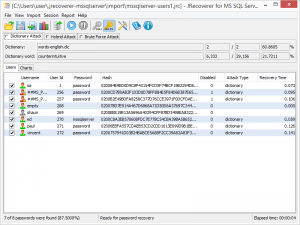
JRecoverer for MS SQL Server Passwords is a specialized password auditing and recovery tool developed by LCPSoft for Microsoft SQL Server databases. This cross-platform application helps database administrators recover lost or forgotten SQL Server user account passwords. The software supports various SQL Server versions and offers multiple recovery methods to handle different password recovery scenarios efficiently.
Key Features
- Cross-Platform Compatibility: Works across multiple operating systems including Windows and Linux, providing flexibility for different environments.
- Multiple Recovery Methods: Offers three distinct password recovery techniques for different scenarios.
- Detailed Reporting: Generates comprehensive reports with account lists, charts, and metrics to track recovery progress.
- Account Information Import: Easily import SQL Server account information by establishing database connections.
- User-Friendly Interface: Intuitive interface that guides users through the recovery process.
- Batch Processing: Recover multiple user account passwords simultaneously.
What’s New in Latest Version
The latest version includes enhanced support for newer SQL Server versions, improved reporting functionality with better analytics and visualizations, and performance optimizations that reduce recovery times. The user interface has received updates for better usability, and the connection establishment process has been streamlined to reduce configuration time when connecting to SQL Server instances.
System Requirements
- Operating System: Windows 10/11, Windows Server 2016 or later, or compatible Linux distributions
- Processor: Intel or AMD processor, 1 GHz or faster
- RAM: Minimum 2 GB (4 GB recommended)
- Hard Disk Space: At least 100 MB of free space
- SQL Server: Compatible with Microsoft SQL Server 2008 and later
- Network: Network connectivity for remote SQL Server instances
- Permissions: Administrator privileges may be required for certain operations
How to Download and Get Started
Download the software from the official LCPSoft website or authorized software distribution platforms. A trial version is available to evaluate before purchasing. After downloading, run the installer and follow the on-screen instructions.
Once installed, launch the application and import your SQL Server account information. Enter your SQL Server instance details including server name, authentication method, and credentials. After establishing the connection, select the accounts for password recovery, choose one of the three recovery methods, and the software will begin the recovery process. You can export detailed reports for documentation or audit purposes.
JRecoverer for MS SQL Server Passwords vs Alternatives
Compared to other SQL Server password recovery tools like Sysinfo MS SQL Server Password Recovery Tool or Nucleus Technologies SQL Password Recovery, JRecoverer’s cross-platform capability sets it apart for mixed-environment organizations. While tools like SysTools SQL Password Recovery offer similar core functionality, JRecoverer’s detailed reporting with charts and metrics provides superior audit trails.
The software is available as part of the JRecoverer Database Bundle (priced at $110), which supports multiple database types including PostgreSQL, MySQL, and Oracle, offering better value for organizations managing diverse database platforms. Free alternatives exist on platforms like SourceForge, but JRecoverer offers professional-grade support and regular updates.
Pros and Cons
Pros:
- Cross-platform compatibility for Windows and Linux
- Multiple recovery methods provide flexibility
- Detailed reporting with charts and metrics
- Reasonably priced at $55 for standalone version
- Database Bundle option for multi-database environments
- User-friendly interface for beginners and advanced users
- Batch processing saves time
Cons:
- Limited independent reviews available online
- Requires technical knowledge of SQL Server architecture
- Recovery success depends on password complexity
- No free version, only trial with limited functionality
- Less known compared to established competitors
Who Should Use JRecoverer for MS SQL Server Passwords
This tool is ideal for database administrators managing SQL Server environments who need to recover lost administrative passwords or audit user account security. IT professionals responsible for maintaining multiple database systems benefit from the cross-platform capability and Database Bundle option. Small to medium-sized businesses that cannot afford extended database downtime due to password issues will appreciate the quick recovery options.
Security auditors and compliance officers can use the detailed reporting features to document password recovery activities. Organizations running mixed operating system environments will particularly value the cross-platform compatibility. Casual users needing one-time password recovery might find free alternatives more cost-effective.
Frequently Asked Questions
Is JRecoverer for MS SQL Server Passwords legal to use?
Yes, when used for legitimate purposes such as recovering your own passwords or authorized password auditing. Always ensure you have proper authorization before attempting password recovery.
Can it recover passwords from the latest SQL Server versions?
Yes, JRecoverer supports SQL Server 2008 and later versions, including recent releases.
How long does the recovery process take?
Recovery time varies depending on password complexity, chosen recovery method, and system performance. Simple passwords may be recovered in minutes, while complex passwords could take longer.
Is there a money-back guarantee?
Check LCPSoft’s official website for their current refund policy. Most software vendors offer trial versions to evaluate before purchase.
Does it work on remote SQL Server instances?
Yes, as long as you can establish a network connection to the remote SQL Server instance and have the necessary permissions.
Final Verdict
JRecoverer for MS SQL Server Passwords is a solid choice for database administrators and IT professionals seeking reliable password recovery. Its cross-platform compatibility is a significant advantage in diverse IT environments, setting it apart from many competitors. The three recovery methods provide flexibility, while detailed reporting features offer valuable audit capabilities for compliance and security purposes.
At $55 for the standalone version, pricing is competitive and reasonable for the functionality provided. The Database Bundle option at $110 delivers exceptional value for organizations managing multiple database platforms. While it may not have extensive user reviews like more established competitors, its technical capabilities and feature set make it a worthy investment for professional database management scenarios.
The tool is particularly recommended for organizations prioritizing cross-platform operation, detailed audit trails, and professional support. Those seeking free alternatives or requiring only occasional password recovery might explore other options. Overall, JRecoverer for MS SQL Server Passwords earns a solid recommendation for its intended audience of database professionals and IT administrators.
Developer:
distribution.
Download Options
Safe & Secure
Verified and scanned for viruses
Regular Updates
Always get the latest version
24/7 Support
Help available when you need it
Pros & Cons Analysis
Pros
- Recovers SQL Server passwords
- Supports multiple SQL versions
- Decrypts sa and user passwords
- Database audit capabilities
- Works with password hashes
- Useful for DBAs
- Professional recovery tool
Cons
- Authorization required for legitimate use
- Technical expertise needed
- Windows-only software
- Limited to SQL Server
- Security audit tool only
- Commercial license required
System Requirements
- Windows 10 or later / macOS 10.15+
- 4 GB RAM recommended
- 350 MB available disk space
- Internet connection required