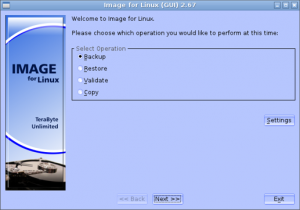
Image for Linux using GUI

1. Introduction
Data loss from hardware failures, malware infections, or system crashes threatens productivity and precious personal files. Image for Linux provides comprehensive backup and disaster recovery capabilities through complete disk imaging, creating exact copies of entire drives or partitions that enable rapid system restoration. Whether protecting business servers, securing personal computers, or managing multiple Linux installations, this software delivers reliable backup solutions without subscription costs or cloud dependencies.
The application serves system administrators managing server backups, IT professionals supporting multiple machines, Linux enthusiasts maintaining complex configurations, and anyone valuing data protection through local, controlled backup solutions. By creating bootable recovery media and storing images on external drives or network locations, it ensures system restoration capability even when primary drives fail completely.
2. Key Features and Capabilities
Complete Disk Imaging: Creates sector-by-sector copies of entire disks or individual partitions, capturing everything including bootloaders, hidden partitions, and system configurations for exact restoration.
Incremental and Differential Backups: Saves only changed data after initial full backup, dramatically reducing backup times and storage requirements for regular backup schedules.
Bootable Recovery Media: Generates standalone boot disks enabling system restoration even when the original installation won’t boot, critical for recovery from catastrophic failures.
Compression and Encryption: Reduces image file sizes through efficient compression while optional AES encryption protects sensitive data in backup images.
Network Backup Support: Stores backup images on network shares, NAS devices, or remote servers, enabling centralized backup management and off-site storage for disaster recovery.
3. Technical Specifications
| Specification | Details |
|---|---|
| Supported OS | All Linux distributions |
| File Systems | ext2, ext3, ext4, XFS, Btrfs, NTFS, FAT |
| Backup Destination | Local drives, network shares, NAS, USB |
| RAM Requirements | Minimum 512MB |
4. Installation and Setup Process
Installation varies by distribution but typically involves downloading the package for your specific distro and installing via package manager. The GUI version requires GTK libraries which most desktop Linux installations include by default. The software installs within minutes and requires minimal disk space for the application itself, though backup storage requirements depend on the size of systems being backed up.
Initial configuration involves selecting drives or partitions to back up, choosing backup destinations, configuring compression and encryption settings, and optionally creating bootable recovery media. The graphical interface guides through these steps with clear explanations, making the process accessible even for Linux users without extensive command-line experience.
5. User Interface and Workflow
The GUI presents a straightforward interface organizing functions into clearly-labeled sections for backup creation, restoration, and recovery media generation. The main window displays available drives and partitions, backup destination options, and configuration settings. Progress displays show backup status, speed, and estimated completion times during operations.
Typical workflow involves selecting source drives/partitions, choosing backup location and filename, configuring compression and incremental settings, and starting the backup process. For restoration, you select the backup image file, choose restoration destination, and confirm the operation. The interface minimizes technical complexity while providing access to advanced options for experienced users.
6. Performance and Reliability
Image for Linux demonstrates efficient backup performance, with speeds typically limited by disk I/O and network bandwidth rather than software bottlenecks. A typical 100GB system backs up to local USB 3.0 drives in 15-25 minutes depending on compression settings and data complexity. Network backups take longer based on network speed, though compression helps reduce transfer times.
CPU usage during backup operations remains moderate, typically 20-40% on modern processors as compression algorithms work. Memory usage stays reasonable, generally under 500MB even during large backup operations. The software efficiently manages resources, allowing concurrent computer use during backup processes without significant performance impact.
Reliability proves excellent, with the software creating verified, restorable images consistently. Integrity checking ensures backup images aren’t corrupted, while detailed logging facilitates troubleshooting any issues. Users report successful recovery from hardware failures, malware infections, and configuration disasters, validating the software’s core promise of reliable data protection.
7. Comparison with Alternatives
| Feature | Image for Linux | Clonezilla | Timeshift |
|---|---|---|---|
| GUI | Full GUI | Text-based menus | Full GUI |
| Incremental Backups | Yes | Limited | Yes (Snapshots) |
| Network Backup | Yes | Yes | No |
| Price | Free (Donationware) | Free (Open Source) | Free (Open Source) |
8. Practical Use Cases
Server Administration: System administrators create regular backups of production servers, enabling rapid recovery from hardware failures or security incidents that could otherwise cause extended downtime.
Workstation Protection: IT departments back up employee workstations before major updates or configuration changes, providing reliable rollback capability if updates cause problems.
Multi-Boot Systems: Linux enthusiasts with complex multi-boot configurations back up individual Linux installations, protecting experimental setups without risking stable systems.
Migration and Cloning: Organizations migrating to new hardware clone existing installations to new machines, avoiding time-consuming manual reinstallation and reconfiguration.
9. Pricing and Value Proposition
Image for Linux operates as donationware—completely free to download and use with optional donations supporting ongoing development. This licensing model provides enterprise-grade backup capabilities without cost barriers, making professional data protection accessible to individual users and organizations alike.
The developer encourages donations from users who find value in the software, with suggested amounts based on use case (personal vs. commercial). However, full functionality remains available regardless of donation status, ensuring data protection capabilities remain accessible to all.
Compared to commercial backup solutions costing hundreds of dollars or requiring subscriptions, Image for Linux delivers comparable functionality at zero mandatory cost. The absence of licensing restrictions makes it particularly valuable for organizations managing multiple systems where per-machine licensing would become prohibitively expensive.
10. Final Verdict
Image for Linux succeeds as a reliable, feature-rich backup solution that makes professional disk imaging accessible to all Linux users regardless of budget. The software excels through its combination of comprehensive functionality and approachable GUI that removes barriers to effective data protection.
The support for incremental backups, network storage, and bootable recovery media provides enterprise-grade capabilities, while the straightforward interface ensures these features remain accessible to users without extensive technical backgrounds. Performance proves adequate for typical backup scenarios, and reliability meets the critical standard of actually working when disaster strikes.
We recommend Image for Linux for all Linux users seeking reliable backup solutions, particularly those managing servers or workstations where data protection justifies investment in proper backup procedures. The donationware model makes it ideal for budget-conscious individuals and organizations, though users benefiting significantly should consider supporting development through donations. For anyone running Linux systems containing irreplaceable data, the time invested in setting up regular backups with Image for Linux provides invaluable insurance against data loss disasters.
Developer:
distribution.
Download Options
Safe & Secure
Verified and scanned for viruses
Regular Updates
Always get the latest version
24/7 Support
Help available when you need it
Pros & Cons Analysis
Pros
- Creates disk images from Linux system
- GUI interface for easier use
- Supports various image formats
- Backup and restore functionality
- Network backup capability
- Bootable recovery option
- Open source software
Cons
- Linux-only application
- Requires technical knowledge
- GUI can be slow on some systems
- Limited compared to commercial solutions
- Documentation could be better
- Smaller community support
System Requirements
- Windows 10 or later / macOS 10.15+
- 4 GB RAM recommended
- 350 MB available disk space
- Internet connection required