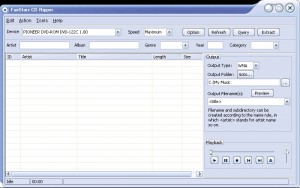
FairStars CD Ripper

What is FairStars CD Ripper?
FairStars CD Ripper is audio extraction software that converts music from CDs to digital files in various formats including MP3, WMA, OGG, FLAC, APE, and WAV. The software reads audio directly from CD tracks using digital extraction methods that preserve quality, then encodes the audio using high-quality codecs included with the application. For users wanting to digitize CD collections for portable players, streaming servers, or archival purposes, FairStars CD Ripper provides the essential conversion functionality with format flexibility.
The application integrates with online databases (CDDB/FreeDB) to automatically retrieve album information, artist names, and track titles, eliminating manual entry for recognized discs. This metadata gets embedded in the output files, ensuring your digital music library includes proper tags for organization and display in media players. Audio normalization options balance volume levels across ripped tracks, and customizable output file naming uses metadata to create organized folder and file structures automatically.
FairStars CD Ripper supports a range of output formats addressing different needs: MP3 for universal compatibility and reasonable file sizes, FLAC or APE for lossless archival preserving perfect quality, OGG for open-source preference, and WMA for Windows ecosystem integration. Quality settings allow balancing file size against audio fidelity, with higher bitrates recommended for archival and lower bitrates acceptable for portable devices with limited storage. For anyone converting CD collections to digital files, FairStars CD Ripper offers straightforward ripping with quality results.
Key Features
- Multiple Output Formats: Rip to MP3, WMA, OGG, FLAC, APE, WAV, and more.
- CDDB/FreeDB Integration: Automatic album and track information retrieval.
- ID3 Tag Editor: Edit and embed metadata in output files.
- Batch Ripping: Rip multiple CDs with consistent settings.
- Normalization: Balance volume levels across tracks.
- Quality Settings: Configure bitrate and encoding parameters.
- Custom Naming: Automatic file/folder naming using metadata variables.
- Error Correction: Handle scratched or damaged discs.
- CD Player: Built-in CD playback functionality.
- Filename Preview: See output names before ripping.
- Speed Control: Adjust ripping speed for accuracy vs. time.
- Command Line: Scriptable operation for automation.
- Portable Mode: Run from USB without installation.
Supported Output Formats
- MP3: Universal compatibility, adjustable bitrate up to 320 kbps
- FLAC: Lossless compression, perfect quality archival
- APE: Monkey’s Audio lossless format
- OGG Vorbis: Open-source lossy format
- WMA: Windows Media Audio format
- WAV: Uncompressed PCM audio
- M4A/AAC: iTunes-compatible format
System Requirements
Minimum Requirements
- Windows XP, Vista, 7, 8, 8.1, 10, or 11
- CD/DVD drive with audio extraction capability
- Intel Pentium processor or equivalent
- 256 MB RAM
- 50 MB free hard disk space (plus space for ripped files)
How to Use FairStars CD Ripper
- Install Software: Download and install FairStars CD Ripper.
- Insert CD: Place audio CD in your disc drive.
- Retrieve Info: Software queries CDDB for album/track details.
- Verify Metadata: Review and edit track information if needed.
- Select Output Format: Choose desired format (MP3, FLAC, etc.).
- Configure Quality: Set bitrate/compression level for chosen format.
- Set Output Location: Choose folder for ripped files.
- Configure Naming: Set file naming pattern using metadata variables.
- Select Tracks: Choose specific tracks or entire CD to rip.
- Start Ripping: Begin extraction and encoding process.
- Verify Results: Check output files play correctly with proper tags.
FairStars CD Ripper vs Alternatives
| Feature | FairStars CD Ripper | EAC (Exact Audio Copy) | Windows Media Player |
|---|---|---|---|
| Price | $19.95 | Free | Free |
| Ease of Use | Easy | Complex | Very Easy |
| Format Support | Many | Many (with plugins) | Limited |
| Accuracy | Good | Excellent | Basic |
| Best For | General users | Audiophiles | Casual users |
Pros and Cons
Pros
- Easy to Use: Straightforward interface for non-technical users.
- Multiple Formats: Wide output format selection built-in.
- Auto Metadata: CDDB integration retrieves album information.
- Quality Options: Configurable encoding parameters.
- Batch Processing: Rip multiple CDs efficiently.
- Portable Mode: Run without installation.
- Included Encoders: No separate codec installation needed.
Cons
- Paid Software: $19.95 cost vs. free alternatives.
- Windows Only: No macOS or Linux versions.
- Less Accurate: Not as precise as EAC for damaged discs.
- CDs Only: Doesn’t rip DVDs or Blu-rays.
- Basic Error Handling: Limited recovery for severely damaged discs.
Frequently Asked Questions
Should I rip to MP3 or FLAC?
Choose FLAC for archival—it’s lossless, preserving perfect CD quality while compressing file size by about 50%. From FLAC archives, you can always create MP3s later. Choose MP3 (at 256-320 kbps) for portable devices where storage matters and the quality difference is inaudible through typical headphones. Many users rip to FLAC for archives and create MP3 copies for portable use.
Why does ripping take so long?
Ripping speed depends on your CD drive, disc condition, and chosen settings. Enable faster ripping speeds in options, though this may increase errors on scratched discs. Newer drives rip faster than older models. Encoding to complex formats (FLAC, high-bitrate MP3) adds processing time after extraction.
The album information wasn’t found automatically. What do I do?
CDDB databases don’t contain every CD, especially rare or independent releases. Manually enter artist, album, and track names using the built-in editor. Your entries help future users if you submit them to the database. For very obscure releases, you may need to research track listings online.
Final Verdict
FairStars CD Ripper provides an accessible solution for converting CD collections to digital files, combining easy operation with flexible output format options. The automatic CDDB lookup and built-in encoders streamline the ripping process, making it practical for users who want straightforward conversion without the configuration complexity of tools like Exact Audio Copy. The variety of output formats—from lossless FLAC for archival to compressed MP3 for portable use—covers typical digitization needs.
The $19.95 price faces stiff competition from free alternatives, and audiophiles seeking perfect extraction may prefer EAC’s more sophisticated error correction. For general users wanting to digitize CD collections without extensive technical knowledge, FairStars CD Ripper delivers reliable results through an intuitive interface. The included encoders and portable operation mode add convenience that partially justifies the cost over free but more complex alternatives.
Download Options
Download FairStars CD Ripper
Download NowSafe & Secure
Verified and scanned for viruses
Regular Updates
Always get the latest version
24/7 Support
Help available when you need it