DVDVideoSoft Free Studio – All-in-One Multimedia Suite

What is DVDVideoSoft Free Studio?
DVDVideoSoft Free Studio bundles dozens of multimedia tools into a single free package, providing capabilities for video conversion, audio processing, image manipulation, and content downloading that would otherwise require purchasing multiple separate applications. The suite has evolved over many years to address the common multimedia tasks that everyday users encounter, from converting videos for mobile devices to extracting audio from YouTube videos.
The collection approach means users install one package and gain access to tools they might need occasionally without hunting for individual utilities when specific needs arise. This convenience, combined with genuinely free licensing without trial limitations or watermarks on output, has made Free Studio a popular choice for users seeking multimedia capabilities without software costs.
Video Tools
Comprehensive video utilities handle conversion, editing, and processing tasks.
Free Video Converter
The video converter transforms video files between formats for compatibility with various devices and platforms. Preset profiles optimize output for specific devices including iPhones, Android phones, tablets, gaming consoles, and media players.
Format support includes popular containers like MP4, AVI, MKV, MOV, and WMV alongside device-specific formats. Codec options within containers accommodate specific player requirements.
Batch conversion processes multiple files with consistent settings, eliminating repetitive configuration for large conversion jobs.
Free Video Editor
Basic video editing capabilities handle common editing needs without professional software complexity. Cutting, joining, and rotating videos addresses frequent requirements for home video preparation.
The editor focuses on essential operations rather than advanced effects, providing accessible tools for users without video editing experience.
Free Video to DVD Converter
DVD creation from video files produces playable discs for DVD players. Menu creation and chapter marking organize content for disc navigation.
While physical disc usage has declined, the tool remains valuable for users sharing videos with recipients who prefer traditional DVD playback.
Free Screen Video Recorder
Screen recording captures desktop activity for tutorials, demonstrations, and documentation. Audio capture from microphone or system sounds accompanies video recording.
Recording area selection enables full screen, window, or region capture depending on content requirements.
Audio Tools
Audio utilities address music and sound processing needs.
Free Audio Converter
Audio format conversion transforms music files between formats including MP3, WAV, FLAC, AAC, WMA, and others. Quality settings balance file size against audio fidelity.
Metadata preservation maintains song information during conversion. Album art, artist names, and track details transfer to converted files.
Free Audio CD Burner
CD creation burns audio tracks to standard audio CDs playable in any CD player. Automatic format conversion handles source files regardless of original format.
Disc-at-once and track-at-once burning modes accommodate different CD player compatibility requirements.
Free Audio CD Grabber
CD ripping extracts tracks from audio CDs to digital files. Format selection and quality settings control output characteristics.
CDDB lookup automatically retrieves track information from online databases, naming files and applying metadata without manual entry.
Free Audio Editor
Basic audio editing provides cutting, joining, and volume adjustment. Simple edits prepare audio content without complex DAW software.
YouTube Tools
Specialized tools interact with YouTube and similar platforms.
Free YouTube Download
Video downloading saves YouTube content for offline viewing. Quality selection from available resolutions balances file size against video quality.
Playlist support downloads multiple videos from YouTube playlists. Channel downloads retrieve creator content collections.
Free YouTube to MP3 Converter
Audio extraction captures soundtracks from YouTube videos. Music videos, podcasts, and other audio content converts to portable MP3 format.
Quality options determine output bitrate and resulting audio fidelity. Higher quality settings produce larger files with better sound.
Free YouTube Uploader
Batch uploading streamlines publishing multiple videos to YouTube. Account integration authenticates with YouTube for upload permissions.
Image Tools
Image utilities handle common photo and graphics tasks.
Free Image Convert and Resize
Batch image processing converts formats and resizes images for various purposes. JPEG, PNG, BMP, GIF, and other formats convert freely.
Resize presets create images sized for specific purposes—web publishing, email attachment, or printing. Custom dimensions accommodate specific requirements.
Free Photo Slideshow Maker
Slideshow creation assembles photos into video presentations with transitions and music. Output formats work on various devices and platforms.
Transition effects animate between slides while background music accompanies visual content.
Free Photo Mosaic
Photo mosaics create images composed of smaller photos. The artistic effect produces interesting composite images from photo collections.
DVD and Disc Tools
Optical disc utilities round out the suite.
Free DVD Video Burner
Video disc creation burns video content to DVDs with menus and navigation. Standard DVD-Video format ensures compatibility with standalone players.
Free Disc Burner
Data disc burning creates CDs, DVDs, and Blu-ray discs with any file content. Standard disc formats ensure broad reading compatibility.
Free DVD Copy
Disc copying duplicates DVDs to other discs or image files. Backup copies preserve content from original discs.
3D Tools
Stereoscopic 3D utilities address specialized needs.
Free 3D Video Maker
3D video creation converts standard video to stereoscopic formats. Various 3D output modes accommodate different display technologies.
Free 3D Photo Maker
3D photo creation produces stereoscopic images from standard photos. Multiple 3D formats support different viewing methods.
User Interface
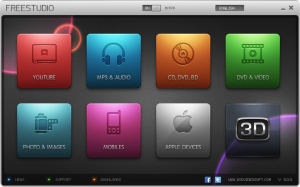
Free Studio presents tools through an organized launcher interface.
Tool Categories
Tools organize by function into categories including video, audio, photo, and disc utilities. Category views group related tools for easy discovery.
Individual Tool Access
Each tool launches in its own window with purpose-specific interface. Tools can run simultaneously for complex workflows involving multiple utilities.
Recent Files
Recent file lists provide quick access to previously processed content. Continuing interrupted work or reprocessing files requires minimal navigation.
Installation Options
Flexible installation addresses different user preferences.
Full Suite Installation
Complete installation includes all suite tools ready for use. Users uncertain of future needs benefit from having all tools available.
Selective Installation
Custom installation selects specific tools to install, conserving disk space and simplifying interfaces for users with specific needs.
Portable Use
Some tools support portable installation to USB drives, enabling use on computers without installation privileges.
Quality and Limitations
Understanding what Free Studio offers and doesn’t offer helps set appropriate expectations.
Output Quality
Conversion quality depends on settings selection. Appropriate quality settings produce results matching source quality; aggressive compression degrades output.
Feature Depth
Individual tools provide essential functionality without advanced features of specialized applications. Users with professional needs may find tools insufficient while casual users find them complete.
Platform Support
Free Studio supports Windows only. Mac and Linux users need alternative solutions.
Licensing and Business Model
Understanding the free offering helps users evaluate appropriateness.
Free Use
Personal use remains genuinely free without feature limitations, watermarks, or time restrictions. Commercial use requires evaluation of license terms.
Premium Versions
Premium versions of some tools offer enhanced features for users needing capabilities beyond free tools. The free tools serve as functional products, not crippled trials.
Bundled Software
Installation may offer optional bundled software. Careful attention during installation enables declining unwanted additions.
Comparison with Alternatives
Free Studio competes with various multimedia solutions.
Individual tools for each function would require finding, evaluating, and learning multiple applications.
Commercial suites like Adobe Creative Cloud provide professional capabilities but at substantial subscription costs.
Open-source alternatives like FFmpeg provide powerful capabilities but require technical expertise.
Free Studio suits users wanting convenience and accessibility without cost or complexity.
System Requirements
Operating System: Windows 11, 10, 8.1, 8, 7 (32-bit and 64-bit)
Processor: 1 GHz or faster
RAM: 512 MB minimum, 2 GB recommended
Storage: 500 MB for full installation
Additional: Internet connection for YouTube features
Conclusion
DVDVideoSoft Free Studio delivers genuine utility through its collection of multimedia tools, addressing common conversion, editing, and processing needs without cost barriers. The suite approach provides convenient access to diverse capabilities that would otherwise require multiple software installations. While individual tools may lack depth compared to specialized applications, the collection addresses most everyday multimedia tasks effectively. For users seeking practical multimedia capabilities without software investment, Free Studio provides a comprehensive solution that has earned its popularity through years of delivering genuine value.
Developer:
DVDVideoSoft
Download Options
Download DVDVideoSoft Free Studio – All-in-One Multimedia Suite
Version 6.7
File Size: 150 MB
Download NowSafe & Secure
Verified and scanned for viruses
Regular Updates
Always get the latest version
24/7 Support
Help available when you need it