Calibre – Free eBook Library Management Software

What is Calibre?
Calibre is the world’s most comprehensive free eBook management software that organizes, converts, edits, and syncs digital book libraries while providing built-in eBook reader, format conversion between virtually all eBook formats, metadata editing with automatic downloads from online databases, and wireless transfer to eReaders and tablets—making it the essential tool for anyone with digital book collections across multiple devices and formats. Created by Kovid Goyal in 2006 and continuously developed through active open-source community, Calibre has grown from simple library manager into complete eBook ecosystem used by millions of readers, librarians, authors, and publishers who need reliable tools for managing everything from small personal collections to massive institutional libraries with tens of thousands of titles. With support for dozens of eBook formats and compatibility with every major eReader brand including Kindle, Kobo, Nook, and generic EPUB devices, Calibre eliminates the frustration of incompatible formats and fragmented libraries.
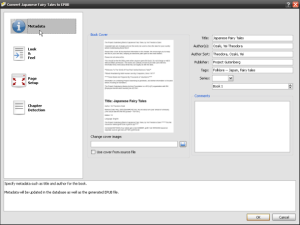
Calibre excels at organizing digital book collections through powerful library management featuring automatic metadata retrieval from Amazon, Google Books, and other sources that populates titles, authors, covers, descriptions, and publication data without manual entry. The software catalogs books by author, series, publisher, tags, or custom columns you create, provides advanced search and filtering across your entire library, displays beautiful cover grid or detailed list views, tracks reading status and ratings, and handles duplicate detection preventing accidental re-downloads. Format conversion transforms eBooks between EPUB, MOBI, AZW3, PDF, and 40+ other formats preserving formatting while optimizing for specific devices—convert purchased EPUB books to MOBI for older Kindles, or PDF textbooks to EPUB for better reflowable reading on tablets. For readers accumulating hundreds or thousands of eBooks across various sources and devices, Calibre provides the organizational backbone that prevents digital book chaos.
Beyond library management and conversion, Calibre includes integrated eBook reader for reading directly on your computer, comprehensive eBook editor for fixing formatting issues or creating new eBooks, news download feature that fetches articles from thousands of websites and converts them to eBook format for offline reading on eReaders, server mode for accessing your library remotely through web browsers, content server for sharing eBooks across household devices, and extensive plugin ecosystem adding features like DRM removal (where legally permitted), enhanced metadata sources, and integration with online services. The software connects with Kindle, Kobo, Nook, and other eReaders via USB for one-click library syncing and format conversion during transfer. For digital readers, authors creating eBooks, librarians managing collections, or anyone serious about eBook management, Calibre delivers professional-grade tools completely free without advertisements or limitations.
Key Features
- Library Management: Organize unlimited eBooks with powerful cataloging, search, and filtering capabilities.
- Automatic Metadata: Download book information, covers, and descriptions from online databases automatically.
- Format Conversion: Convert between EPUB, MOBI, AZW3, PDF, TXT, and 40+ eBook formats.
- eReader Sync: One-click transfer to Kindle, Kobo, Nook, and other eReaders with automatic conversion.
- Built-in eBook Reader: Read eBooks directly in Calibre without external applications.
- eBook Editor: Comprehensive EPUB and AZW3 editor for fixing formatting or creating new books.
- News Download: Fetch articles from thousands of news sites and convert to eBooks for offline reading.
- Content Server: Access library remotely through web browser from any device.
- Cover Management: Download, edit, and organize book covers with automatic sourcing.
- Custom Columns: Create custom metadata fields for personalized organization and tracking.
- Series Management: Track book series with automatic numbering and order.
- Duplicate Detection: Find and manage duplicate books across library automatically.
- Plugin System: Extend functionality with hundreds of community-created plugins.
- Multi-Device Support: Manage books for multiple eReaders and tablets simultaneously.
- Completely Free: Open-source software with all features available without cost or restrictions.
What’s New in Calibre 2024/2025
- Calibre 7.0 Release: Major update with performance improvements and new features.
- Better EPUB Support: Enhanced EPUB 3.3 support with improved reflowable layout handling.
- Improved Kindle Integration: Better support for latest Kindle devices and formats including KFX.
- Enhanced eBook Viewer: Redesigned reader with better touch support and modern interface.
- Faster Conversion: Optimized conversion engine processes books significantly faster.
- Better Metadata Editing: Improved metadata editor with more sources and better accuracy.
- Updated Content Server: Modern web interface for accessing library remotely.
- Performance Improvements: Faster library loading and searching, especially on large collections.
- Windows 11 Support: Full compatibility and optimization for Windows 11.
- Enhanced News Downloads: More news sources and better article extraction.
System Requirements
Windows
- Windows 7, 8, 8.1, 10, or Windows 11
- 32-bit or 64-bit (64-bit recommended)
- 1 GHz processor or faster
- 512 MB RAM minimum (2 GB+ recommended for large libraries)
- 300 MB disk space for installation
- Additional space for eBook library storage
macOS
- macOS 10.13 High Sierra or later
- Intel or Apple Silicon (M1/M2/M3) processors
- 512 MB RAM minimum
- 300 MB available disk space
Linux
- Most modern distributions (Ubuntu, Fedora, Debian, etc.)
- 64-bit and 32-bit versions available
- Available as binary package for easy installation
- 512 MB RAM minimum
Important Notes
- eReaders connect via USB for syncing
- Larger libraries benefit from faster processors and more RAM
- SSD recommended for libraries with thousands of books
How to Get Started with Calibre
- Download: Visit calibre-ebook.com and download installer for your operating system.
- Install: Run installer and follow prompts—installation completes in minutes.
- Launch Calibre: Open application—welcome wizard helps configure library location and device preferences.
- Set Library Location: Choose folder where Calibre stores your eBook library.
- Add Books: Click “Add books” and select eBooks from computer—Calibre imports and catalogs them.
- Download Metadata: Right-click books and select “Download metadata and covers” for automatic information.
- Connect eReader: Plug in Kindle, Kobo, or other eReader via USB—Calibre detects device automatically.
- Send to Device: Select books, click “Send to device” to transfer and convert if needed.
- Convert Formats: Select book, click “Convert books,” choose output format for device-specific optimization.
- Explore eBook Reader: Double-click any book to open in Calibre’s built-in reader.
- Organize with Tags: Add custom tags, ratings, and categories for better library organization.
- Try News Downloads: Fetch news > Schedule news download to convert news sites to eBooks daily.
Calibre vs Alternatives
| Feature | Calibre | Adobe Digital Editions | Amazon Kindle App |
|---|---|---|---|
| Price | Free, open-source | Free | Free |
| Library Management | Comprehensive | Basic | Cloud-only |
| Format Support | 40+ formats | EPUB, PDF only | Amazon formats only |
| Format Conversion | Extensive | None | None |
| Device Support | All major eReaders | Limited | Kindle only |
| Best For | Power users, large libraries | DRM EPUB reading | Amazon ecosystem |
Pros and Cons
Pros
- Completely Free: All features available without cost, ads, or premium tiers forever.
- Comprehensive Format Support: Handles virtually every eBook format including EPUB, MOBI, PDF, and dozens more.
- Powerful Conversion: Convert between formats while preserving formatting and metadata.
- Automatic Metadata: Saves hours of manual data entry through online database integration.
- Device Agnostic: Works with Kindle, Kobo, Nook, and generic EPUB readers equally well.
- Open Source: Transparent development with no vendor lock-in or data collection.
- Active Development: Regular updates add features and improve compatibility.
- Extensive Features: Complete eBook ecosystem from reading to editing to serving.
- Cross-Platform: Identical functionality on Windows, Mac, and Linux.
- Plugin Ecosystem: Hundreds of community plugins extend functionality limitlessly.
Cons
- Overwhelming Interface: Feature-rich UI can intimidate new users with steep learning curve.
- Dated Appearance: Interface looks old-fashioned compared to modern applications.
- Resource Intensive: Large libraries can slow down on older hardware.
- Complex for Simple Needs: Overkill if you only read Amazon Kindle books.
- No DRM Support: Cannot read DRM-protected books without third-party plugins (legal gray area).
- Occasional Bugs: Conversion quirks with certain complex eBooks or formats.
Who Should Use Calibre?
Calibre is ideal for:
- Avid Readers: People with large eBook collections needing organization and management.
- Multi-Device Owners: Readers using multiple eReaders, tablets, or phones for reading.
- Format Switchers: Anyone converting between eBook formats for different devices.
- Librarians: Managing institutional or personal libraries with hundreds or thousands of titles.
- Authors/Publishers: Creating, editing, and distributing eBooks in multiple formats.
- News Readers: Those wanting newspaper and magazine articles converted to eBook format for offline reading.
- Open Format Advocates: Readers preferring DRM-free books and device independence.
- Tech-Savvy Readers: Users comfortable with powerful software and extensive customization.
- Cross-Platform Users: Managing eBooks across Windows, Mac, and Linux systems.
- Privacy-Conscious: Readers wanting local library management without cloud dependencies.
Frequently Asked Questions
Is Calibre completely free or are there hidden costs?
Calibre is genuinely 100% free and open-source software without hidden costs, subscriptions, or premium features. All functionality—library management, format conversion, eBook editing, news downloads, content server, and more—is available without payment or feature restrictions. Development is funded through voluntary donations, but donations are optional and don’t unlock any features. Download, use, and enjoy Calibre indefinitely without ever paying or encountering paywalls.
Can Calibre convert Kindle books to EPUB?
Calibre can convert Kindle formats (AZW, AZW3, MOBI) to EPUB if the books are DRM-free. Books purchased from Amazon typically include DRM protection preventing conversion—Calibre cannot legally remove DRM by default. Third-party plugins like DeDRM exist for removing DRM from personal purchases (legal in some jurisdictions for personal use, illegal in others), but installing and using such plugins is user’s responsibility regarding local laws. DRM-free books from sources like Project Gutenberg or O’Reilly convert perfectly between Kindle and EPUB formats.
Does Calibre work with Kindle, Kobo, and other eReaders?
Yes, Calibre supports virtually all eReaders including Amazon Kindle, Kobo, Barnes & Noble Nook, and generic EPUB devices. Connect your eReader via USB, and Calibre detects it automatically. You can then send books to the device with automatic format conversion if needed—Calibre converts EPUB to MOBI for older Kindles, or optimizes files for your specific device model. The software handles device-specific quirks ensuring books display correctly across different manufacturers and models.
Why does Calibre look so outdated?
Calibre’s interface prioritizes functionality over modern aesthetics, focusing development resources on features, compatibility, and stability rather than visual redesigns. The software uses Qt framework providing cross-platform consistency but resulting in less polished appearance than native applications. For users valuing comprehensive features and reliability over sleek UI, Calibre’s appearance is acceptable tradeoff. The interface is fully functional and keyboard-friendly once you learn it, though admittedly less visually appealing than commercial alternatives with dedicated design teams.
Final Verdict
Calibre has earned its position as the definitive eBook management solution through comprehensive features, format flexibility, and powerful organization tools that no other free software matches—whether you’re managing a dozen books or tens of thousands of titles across multiple devices and formats. The combination of automatic metadata retrieval, universal format conversion, multi-device sync, integrated reading and editing, and news downloading creates complete eBook ecosystem that eliminates fragmentation across proprietary ecosystems like Kindle, Kobo, and Apple Books. For readers serious about building and managing digital libraries without vendor lock-in or format restrictions, Calibre provides the professional-grade tools that justify its learning curve and dated interface.
While simple readers exclusively using Kindle or Apple Books may find Calibre overkill, anyone with mixed device ecosystems, large collections, or desire for format independence will quickly appreciate Calibre’s power and flexibility. The completely free, open-source nature with active development ensures Calibre will remain available and improving for years to come without subscription fees or forced cloud services that plague commercial alternatives. Download from calibre-ebook.com and discover why millions of readers, librarians, and authors worldwide trust Calibre as the foundation of their digital reading lives—proving that the best eBook management software doesn’t require expensive subscriptions or walled gardens, just passionate developers focused on empowering readers.
Developer:
Kovid Goyal
Download Options
Safe & Secure
Verified and scanned for viruses
Regular Updates
Always get the latest version
24/7 Support
Help available when you need it
System Requirements
- Windows 7+, macOS 10.13+, Linux, 512MB RAM minimum