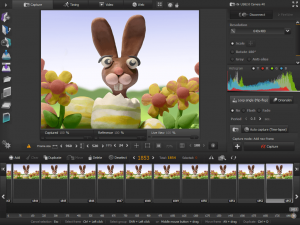
AnimaShooter Pioneer

What is AnimaShooter Pioneer?
AnimaShooter Pioneer is a specialized stop-motion animation software developed by Animation Technologies LTD for Windows users who want to create professional-quality claymation and stop-motion videos. This user-friendly application enables animators of all skill levels to capture frame-by-frame sequences using webcams, Canon DSLR cameras, or DV cameras. The software features an intuitive interface that simplifies the complex process of stop-motion animation, making it accessible for both beginners exploring animation and professionals working on commercial projects. AnimaShooter Pioneer supports high-resolution capture up to 3840×2400 (WQUXGA), ensuring your animations maintain excellent visual quality throughout the production process.
Key Features
Multi-Camera Support: Works seamlessly with any webcam, Canon EOS DSLR cameras, and DV cameras with resolution support up to Full HD (1920×1080) and beyond.
Onion Skinning: View previous frames as transparent overlays to ensure smooth motion continuity between shots, essential for professional stop-motion work.
Real-Time Preview: Watch your frame sequence in motion immediately to identify issues before finalizing your project.
Exposure Sheet Generation: Create detailed X-sheets documenting your animation timeline, with the ability to export them as PDF files for team collaboration.
Chroma Key Tool: Remove green or blue screen backgrounds to composite your stop-motion animation with different environments.
Time-Lapse Mode: Set up automated capture at specified intervals for creating time-lapse sequences without manual triggering.
Manual Camera Controls: Adjust shutter speed, white balance, ISO, and aperture values directly from the software for precise exposure control.
Multiple Export Formats: Output your animations as WebM, OGV (HTML5 video), MPEG4, or uncompressed video, plus export frame sequences as PNG, JPG, TIFF, or WebP images.
What’s New in AnimaShooter Pioneer
Version 3.9.9.6 introduces several improvements to the animation workflow. The updated interface provides better frame navigation and enhanced timeline controls. Performance optimizations reduce lag when working with high-resolution footage from DSLR cameras. The export engine has been refined to generate smaller file sizes without compromising quality. New camera compatibility has been added for recent Canon EOS models. The chroma key tool features improved edge detection for cleaner green screen removal. Users will notice faster project loading times and more responsive playback when previewing long animation sequences.
System Requirements
Operating System: Windows 11, Windows 10, Windows 8.1, Windows 8, or Windows 7
Processor: Intel or AMD compatible CPU running at 1.6 GHz or faster
Memory: Minimum 3 GB RAM (8 GB recommended for HD projects)
Storage: 200 MB for software installation plus adequate space for project files
Camera: Compatible webcam, Canon EOS DSLR, or DV camera
Internet Connection: Required for software activation and documentation access
Additional: USB port for camera connection
Download Guide
Navigate to the official AnimaShooter website at www.animashooter.com to download the latest version. Click the Download button for AnimaShooter Pioneer and save the installer to your computer. Run the downloaded .exe file and follow the installation wizard prompts. The trial version has no functional limitations, no watermarks, and allows unlimited frame capture for evaluation. Once installed, launch AnimaShooter Pioneer and connect your camera. The software will automatically detect compatible devices. To activate the full version, purchase a license from the official website and enter your activation code in the registration dialog. The built-in web browser provides access to comprehensive user documentation and tutorials to help you start creating animations immediately.
AnimaShooter Pioneer vs Alternatives
vs Dragonframe: Dragonframe offers more advanced professional features and cross-platform support but comes at a significantly higher price point. AnimaShooter Pioneer provides excellent value for Windows users who don’t need Mac or Linux compatibility.
vs Stop Motion Studio: Stop Motion Studio targets mobile and casual users with simplified features, while AnimaShooter Pioneer delivers more professional tools like exposure sheets and advanced camera controls for serious animators.
vs MonkeyJam: MonkeyJam is free and open-source but hasn’t been updated in years. AnimaShooter Pioneer offers modern features, active development, and support for current camera models.
vs iStopMotion: iStopMotion is Mac-exclusive with a user-friendly interface similar to AnimaShooter Pioneer, but Windows users cannot access it without switching platforms.
Pros and Cons
Pros:
- Intuitive interface suitable for beginners and professionals
- No watermarks or frame limits in trial version
- Comprehensive camera support including Canon DSLRs
- Built-in exposure sheet generation and export
- Real-time preview and onion skinning features
- Multiple export format options
- Affordable one-time purchase pricing
- Active development with regular updates
Cons:
- Windows-only platform limits cross-platform workflows
- Limited audio editing capabilities compared to full video editors
- Lacks some advanced features found in high-end solutions like Dragonframe
- Camera compatibility primarily focused on Canon DSLRs
- Documentation could be more comprehensive for advanced techniques
Who Should Use AnimaShooter Pioneer?
Independent animators working on personal stop-motion projects will appreciate the balance of features and affordability. Students learning animation techniques can explore professional-grade tools without expensive software investments. Small animation studios producing commercial content will find the exposure sheet generation and camera controls essential for client work. Hobbyists creating claymation videos for YouTube or social media benefit from the unlimited trial for testing projects. Teachers conducting animation workshops can use the software’s intuitive interface to help students understand frame-by-frame animation principles. Content creators integrating stop-motion elements into larger video productions will value the multiple export formats and chroma key capabilities for seamless compositing.
Frequently Asked Questions
Is AnimaShooter Pioneer completely free?
The software offers an unlimited trial with full features and no watermarks, allowing you to evaluate all capabilities before purchasing a license for commercial use.
What cameras are compatible?
AnimaShooter Pioneer works with any webcam, Canon EOS DSLR cameras, and DV cameras. Canon DSLRs provide the best quality with manual control support.
Can I use it on Mac or Linux?
No, AnimaShooter Pioneer is exclusively for Windows operating systems (Windows 7 through Windows 11).
Does it support audio recording?
The software focuses on frame capture and video export. Audio should be added during post-production using video editing software.
What’s the difference between Pioneer and Capture versions?
AnimaShooter Capture is the entry-level version with basic features, while Pioneer includes advanced tools like exposure sheets, chroma key, and enhanced export options.
How many frames can I capture?
There are no frame limitations in either the trial or full version, allowing projects of any length.
Final Verdict
AnimaShooter Pioneer delivers an excellent balance of professional features and user accessibility for Windows-based stop-motion animation. The software’s generous trial policy allows thorough evaluation without restrictions, demonstrating the developers’ confidence in their product. While it lacks cross-platform support and some ultra-advanced features found in premium alternatives like Dragonframe, the affordable pricing and comprehensive toolset make it an outstanding choice for the majority of stop-motion creators. The onion skinning, real-time preview, and exposure sheet generation features provide professional workflow efficiency, while the intuitive interface ensures beginners won’t feel overwhelmed. For Windows users seeking reliable stop-motion software that won’t break the budget, AnimaShooter Pioneer represents exceptional value and capability.
Developer:
AnimaShooter Pioneer
Download Options
Safe & Secure
Verified and scanned for viruses
Regular Updates
Always get the latest version
24/7 Support
Help available when you need it
Pros & Cons Analysis
Pros
- Professional stop-motion animation features
- Exposure sheet generation and export
- Multi-camera support
- Frame-by-frame capture with preview
- Chroma key compositing
- Audio track synchronization
- Affordable compared to professional alternatives
Cons
- Windows-only application
- Requires compatible DSLR camera
- Steeper learning curve than Capture version
- No cloud collaboration features
- Limited third-party plugin support
- Export options could be more extensive
System Requirements
- Windows 7 or later / macOS 10.12 or later
- 2 GB RAM minimum
- 500 MB available disk space
- Internet connection for updates