Active@ File Recovery

1. Introduction
Accidental file deletion, drive formatting, and hardware failures threaten irreplaceable data. Active@ File Recovery provides comprehensive data recovery capabilities for Windows and macOS, retrieving deleted files, recovering formatted partitions, and salvaging data from damaged drives. Whether recovering accidentally deleted photos, restoring formatted drives, or retrieving data from failing hardware, this software delivers professional recovery tools for both individuals and IT professionals.
The application serves users experiencing data loss, IT professionals managing recovery operations, and anyone needing to retrieve valuable files from various failure scenarios.
2. Key Features
Deep Scan Recovery: Performs sector-by-sector scanning to locate files even after formatting or partition deletion, recovering data that quick scans miss.
Multi-Format Support: Recognizes and recovers hundreds of file types including documents, photos, videos, archives, and databases across all major file systems.
Bootable Recovery Media: Creates bootable USB drives enabling recovery when operating systems won’t start, critical for system drive failures.
Preview Before Recovery: Displays recoverable file previews before restoration, confirming file integrity and reducing unnecessary recovery operations.
3. Technical Specifications
| Specification | Details |
|---|---|
| Supported OS | Windows 7-11, macOS 10.14+ |
| File Systems | NTFS, FAT, exFAT, HFS+, APFS, Ext2/3/4 |
| Recovery Sources | Hard drives, SSDs, USB drives, memory cards |
4. Installation and Setup
Installation completes quickly with standard setup procedures. The software includes bootable media creator for preparing recovery USB drives before emergencies occur.
5. User Interface and Workflow
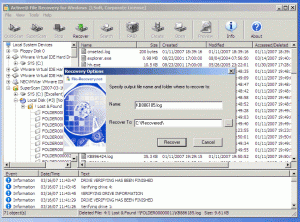
The interface guides users through recovery with wizard-based workflows. Process involves selecting affected drive, choosing scan depth, previewing found files, and recovering selected data to safe locations.
6. Performance and Reliability
Active@ File Recovery demonstrates effective recovery rates across various failure scenarios. Scan speeds vary by drive size and scan depth, with quick scans completing in minutes while deep scans may require hours for large drives.
7. Comparison with Alternatives
| Feature | Active@ File Recovery | Recuva | EaseUS |
|---|---|---|---|
| Bootable Recovery | Yes | No | Yes (Pro) |
| Price | $39.99 | Free/Pro $19.95 | $69.95 |
8. Practical Use Cases
Accidental Deletion Recovery: Users restore accidentally deleted family photos, important documents, and project files before backups overwrite them.
Format Recovery: IT professionals recover data from mistakenly formatted drives, salvaging entire partitions of business data.
Drive Failure Recovery: Users retrieve data from failing hard drives showing errors, recovering files before complete hardware failure.
9. Pricing and Value Proposition
Active@ File Recovery costs $39.99 for personal use, with business licenses at $299. A free version recovers files up to 1MB, allowing verification of recovery success before purchase. The pricing provides good value for professional recovery capabilities.
10. Final Verdict
Active@ File Recovery successfully delivers reliable data recovery through comprehensive scanning and effective file retrieval. The software excels by providing professional-grade recovery tools at consumer-friendly prices.
We recommend Active@ File Recovery for users facing data loss from deletion, formatting, or drive failure. The bootable recovery capability and wide file system support make it suitable for both personal and professional recovery needs. The free trial with limited recovery confirms files are recoverable before financial commitment.
Developer:
Active@ File Recovery
Download Options
Download Active@ File Recovery
Download NowSafe & Secure
Verified and scanned for viruses
Regular Updates
Always get the latest version
24/7 Support
Help available when you need it
Pros & Cons Analysis
Pros
- Recovers deleted files from HDD SSD and USB drives
- Supports NTFS FAT exFAT and HFS+ file systems
- Signature-based recovery for formatted drives
- Preview files before recovery
- Creates disk images for safe recovery
- RAID reconstruction support
- Bootable recovery environment option
Cons
- Paid software after trial period
- Full recovery requires purchased license
- Scan times can be lengthy on large drives
- Advanced features require technical knowledge
- No Mac version available
- Interface could be more intuitive
System Requirements
- Windows 7 or later / macOS 10.12 or later
- 2 GB RAM minimum
- 500 MB available disk space
- Internet connection for updates