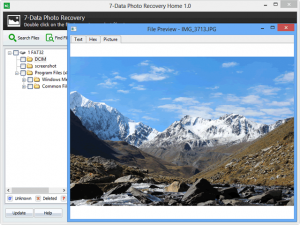
7-Data Photo Recovery

What is 7-Data Photo Recovery?
7-Data Photo Recovery is a specialized Windows software application designed to recover lost, deleted, or corrupted photo files from various storage devices including SD cards, digital cameras, memory sticks, local hard drives, and external storage devices. Developed by 7-Data Software, this tool focuses primarily on image recovery while also providing the capability to restore video and audio files, making it a comprehensive multimedia recovery solution for photographers, content creators, and everyday users who have experienced data loss.
The software employs advanced scanning algorithms to locate and recover photos that have been accidentally deleted, lost due to formatting, removed from the recycle bin, or corrupted due to file system errors. Unlike general-purpose data recovery tools that attempt to recover all file types with equal priority, 7-Data Photo Recovery optimizes its scanning and recovery processes specifically for image formats, resulting in more efficient recovery of photo files from damaged or formatted storage media.
7-Data Photo Recovery stands out for its user-friendly approach to what can be a technically complex process. The software guides users through the recovery process with an intuitive interface that doesn’t require advanced technical knowledge. It supports all common image formats including JPG, PNG, GIF, BMP, RAW camera formats from major manufacturers, and various video and audio formats. The tool is particularly valuable for photographers who have accidentally formatted memory cards, deleted important photo files, or experienced corruption on digital camera storage media.
Key Features
Multiple Recovery Modes for Different Scenarios: 7-Data Photo Recovery includes four distinct recovery modes designed to address different data loss situations. The Deleted Recovery mode specifically targets files that have been deleted from the recycle bin or permanently removed from storage using Shift+Delete. Complete Recovery mode is designed for more severe data loss scenarios, helping restore files from formatted or corrupted volumes where the file system structure has been damaged. This multi-mode approach ensures users can select the most appropriate recovery method based on how the data was lost, improving success rates and reducing scan times.
Wide Storage Device Compatibility: The software can access and recover photos from virtually any storage device that connects to a Windows computer. This includes local hard drives (both HDD and SSD), external USB hard drives, SD cards, microSD cards, CompactFlash cards, Memory Stick cards, digital camera internal storage, USB flash drives, and portable media players. The broad device compatibility makes 7-Data Photo Recovery suitable for recovering photos from professional DSLR cameras, smartphones, action cameras, drones, and any other device that stores photo files.
Comprehensive File Format Support: While optimized for photo recovery, 7-Data Photo Recovery supports an extensive range of file formats. For images, it can recover common formats like JPEG, JPG, PNG, GIF, BMP, TIFF, and importantly, RAW camera formats from major manufacturers including Canon (CR2, CRW), Nikon (NEF), Sony (ARW), Panasonic (RW2), Olympus (ORF), Fuji (RAF), and many others. The software also recovers video files in formats such as MP4, AVI, MOV, MKV, and audio files including MP3, WAV, WMA, making it useful for multimedia content creators beyond just photography.
Deep Scan Technology: The software incorporates deep scan technology that goes beyond simple file system analysis. When files are deleted, only the file system reference is removed while the actual data often remains on the storage device until overwritten. 7-Data Photo Recovery’s deep scan examines the entire storage device at a binary level, searching for file signatures and data patterns that indicate photo files, even when file system metadata has been completely lost. This technology significantly improves recovery success rates for severely corrupted or formatted storage devices.
Preview Before Recovery: One of the most practical features is the ability to preview recoverable photos before actually performing the recovery. After the scan completes, users can click on image files to see thumbnails and previews, allowing them to verify that the files are intact and contain the expected content before investing time in the recovery process. This preview capability helps users selectively recover only the photos they need, saving time and storage space.
Partition and SD Card Repair: Beyond simple file recovery, 7-Data Photo Recovery includes utilities to address underlying storage issues. The software can fix SD card errors, repair partition problems, and address corrupted file system structures that cause data to become inaccessible. This repair capability is particularly valuable for memory cards that have become corrupted due to improper removal, power loss during file transfers, or file system corruption.
Free Recovery Up to 1GB: 7-Data Photo Recovery offers a genuinely free version that allows users to recover up to 1GB of data without requiring a paid upgrade. This generous free tier enables users to evaluate the software’s effectiveness and successfully recover moderate amounts of data without financial commitment. For many users who have lost a small number of important photos, the 1GB limit is sufficient to recover all needed files.
Simple Three-Step Recovery Process: The software simplifies the recovery process into three straightforward steps: select the drive or storage device to scan, wait for the scan to complete and preview recoverable files, and select files to recover and choose a destination. This streamlined workflow makes photo recovery accessible to non-technical users who might be intimidated by complex recovery procedures.
What’s New in Latest Version
The most recent version of 7-Data Photo Recovery is version 1.6, which represents an incremental update to the software’s core recovery engine and user interface. While 7-Data Software has maintained the program with periodic updates, the latest version from July 2019 (v4.4 of the suite) focuses on stability improvements and compatibility with newer Windows versions rather than introducing revolutionary new features.
Recent updates have improved the software’s compatibility with Windows 10, including support for newer storage device drivers and file system structures used by modern external drives and SD cards. The scanning engine received optimizations to handle larger capacity storage devices more efficiently, as modern SD cards and external drives now commonly reach 128GB, 256GB, or even 1TB+ capacities that require extended scan times.
The deep scan algorithm was refined to improve recovery success rates for fragmented files, which occur when photo files are not stored in contiguous clusters on the storage device. This fragmentation is increasingly common on devices that have been heavily used with many write and delete cycles. The updated algorithm better reconstructs fragmented photo files, resulting in more complete recoveries.
Support for newer RAW camera formats was expanded to include formats from recently released camera models from major manufacturers. As camera manufacturers update their proprietary RAW formats with new camera releases, 7-Data Photo Recovery regularly updates its format recognition to ensure compatibility with the latest equipment.
User interface improvements include better progress indicators during scanning operations, clearer labeling of recovery modes to help users select the appropriate method, and improved preview functionality that can display thumbnails for a wider range of image formats. Performance optimizations reduced memory usage during large-scale scans, making the software more stable when recovering from high-capacity storage devices.
System Requirements
7-Data Photo Recovery is designed exclusively for Windows operating systems and does not support macOS or Linux. The software is compatible with a wide range of Windows versions, from older systems like Windows Server 2003, Windows XP, Windows Vista, Windows 7, and Windows 8, up to the current Windows 10 and Windows 11 operating systems. This broad compatibility ensures the software works on both legacy systems and modern Windows installations.
The hardware requirements for 7-Data Photo Recovery are modest, allowing the software to run on older computers that might still be in use. A minimum of 1GB of RAM is required, though 2GB or more is recommended for better performance, especially when scanning large-capacity storage devices or working with high-resolution RAW camera files. Any processor from the past 10-15 years should be sufficient, as the software is not particularly CPU-intensive during normal operations.
For hard drive space, the software itself requires only 5.1MB for installation, making it one of the smallest data recovery applications available. However, you’ll need additional free space on your system drive or another drive to store recovered photos. The amount of space needed depends on how many photos you’re recovering, but it’s important to never recover files back to the same drive they were lost from, as this can overwrite the data you’re trying to recover.
The software requires administrator privileges to install and run, as it needs low-level access to storage devices to perform recovery operations. USB ports are necessary if you’re recovering from external devices, SD card readers, or camera memory cards. The computer should have a functional display capable of at least 1024×768 resolution to properly view the interface and preview recovered images.
While not strictly required, an internet connection is helpful for downloading the software, checking for updates, and accessing online support resources. However, the recovery process itself does not require internet connectivity, so you can use the software on offline computers.
Download Guide
Downloading and installing 7-Data Photo Recovery is a straightforward process that takes just a few minutes. The software is available from multiple sources, though downloading from reputable software repositories or the official 7-Data website is recommended to ensure you receive the authentic, malware-free version.
To download 7-Data Photo Recovery, visit trusted software download sites such as Download3K, Softonic, or similar reputable sources that host the official installer. The download file size is very small at just over 5MB, making it a quick download even on slower internet connections. Look for version 1.6, which is the latest stable release of the photo-specific recovery tool.
Once the installer has downloaded, locate the file in your Downloads folder and double-click to run it. Windows may display a User Account Control prompt asking for administrator permission to install the software – click “Yes” to proceed. The installation wizard will guide you through the setup process, which includes accepting the license agreement, choosing an installation directory (the default location is typically fine), and selecting whether to create desktop shortcuts.
The installation completes in under a minute on most systems. After installation, you can launch 7-Data Photo Recovery from the Start menu or desktop shortcut. When you first run the software, it will operate in free mode, allowing you to scan drives and preview recoverable files without any restrictions. The free version permits recovery of up to 1GB of data, which is often sufficient for recovering a moderate number of lost photos.
If you need to recover more than 1GB of data, you can purchase a license key from the 7-Data website. After purchase, you’ll receive a registration code via email that can be entered into the software to unlock unlimited recovery capacity. The paid license is typically a one-time purchase rather than a subscription, allowing unlimited use of the software.
Important note: Before installing any data recovery software, it’s crucial to stop using the drive where data was lost. Every write operation to that drive increases the risk of overwriting the deleted files you want to recover. If possible, install 7-Data Photo Recovery on a different drive than the one you’re recovering from.
7-Data Photo Recovery vs Alternatives
7-Data Photo Recovery vs Disk Drill: Disk Drill is one of the most popular and user-friendly data recovery tools available, known for its powerful recovery capabilities and beginner-friendly interface. Disk Drill performs consistently well across all standard file system formats (ExFAT, FAT32, NTFS, HFS+, APFS) and features one of the most impressive signature scanners available. While 7-Data Photo Recovery specializes in photo and multimedia recovery, Disk Drill offers broader data recovery capabilities for all file types. Disk Drill is available for both Windows and Mac, whereas 7-Data Photo Recovery is Windows-only. However, Disk Drill’s free version is more limited in recovery capacity compared to 7-Data’s 1GB free tier, and the full version is more expensive.
7-Data Photo Recovery vs PhotoRec: PhotoRec is a free, open-source file recovery software that’s highly regarded in the data recovery community. PhotoRec is completely free with no limitations and runs on Windows, Mac, Linux, and BSD systems, making it far more versatile in terms of platform support. However, PhotoRec uses a command-line interface that can be intimidating for non-technical users, whereas 7-Data Photo Recovery provides a graphical interface that’s much easier to navigate. PhotoRec is extremely powerful and often recovers files that other tools miss, but the learning curve is steeper. For users comfortable with command-line tools, PhotoRec offers more power at no cost, but for those preferring a graphical interface, 7-Data Photo Recovery is more accessible.
7-Data Photo Recovery vs Recuva: Recuva, developed by Piriform (makers of CCleaner), is a popular free data recovery tool that’s lightweight and 100% free to use for external drives, memory cards, and other storage devices. Recuva has successfully recovered photos, videos, and documents for countless users and offers a simple wizard-based interface similar to 7-Data Photo Recovery. The main difference is that Recuva is completely free without the 1GB limitation of 7-Data’s free version, though it may not be as specialized for photo recovery. Recuva lags behind other apps in user experience and extra features, offering a more basic set of recovery options compared to 7-Data Photo Recovery’s specialized photo recovery modes.
7-Data Photo Recovery vs Wondershare Recoverit: Wondershare Recoverit is a comprehensive data recovery solution that covers all data loss scenarios including accidental deletion, formatting, partition loss, virus attacks, and system crashes. Recoverit is available for both Windows and Mac, offering broader platform support than 7-Data Photo Recovery. Wondershare provides a more polished, modern interface with guided workflows and extensive file format support. However, Recoverit is more expensive than 7-Data Photo Recovery and positions itself as a premium solution. For users who need Mac support or want a more comprehensive recovery tool beyond just photos, Recoverit is worth the investment, but for Windows users focused primarily on photo recovery, 7-Data Photo Recovery offers better value.
7-Data Photo Recovery vs R-Studio: R-Studio is one of the most reliable and professionally-oriented data recovery tools available, used by IT professionals and data recovery specialists. R-Studio offers advanced features like RAID reconstruction, network recovery, and hex editor integration that go far beyond what 7-Data Photo Recovery provides. However, R-Studio is significantly more expensive and has a steeper learning curve, making it overkill for typical photo recovery needs. R-Studio is the better choice for professional data recovery operations or complex scenarios, while 7-Data Photo Recovery is more appropriate for straightforward photo recovery by everyday users.
Pros and Cons
Pros:
- Free version allows recovery of up to 1GB of data without requiring a paid upgrade
- Specialized focus on photo recovery with optimized algorithms for image file formats
- Supports extensive range of image formats including RAW camera files from all major manufacturers
- User-friendly interface with three-step recovery process accessible to non-technical users
- Multiple recovery modes address different data loss scenarios effectively
- Preview functionality allows verification of recoverable photos before recovery
- Very small installation footprint at just 5.1MB
- Can recover video and audio files in addition to photos
- Includes repair utilities for SD card errors and partition problems
- Compatible with wide range of Windows versions from XP to Windows 11
- Works with all common storage devices including SD cards, cameras, and external drives
- Deep scan technology increases recovery success for severely damaged storage
Cons:
- Windows-only compatibility excludes Mac and Linux users
- Development appears to have slowed with last major update in July 2019
- Free 1GB recovery limit may be insufficient for users with large photo collections
- Less powerful than professional tools like R-Studio for complex recovery scenarios
- No cloud-based or network recovery capabilities
- Interface feels somewhat dated compared to modern recovery applications
- Limited advanced features compared to more comprehensive recovery suites
- No Mac version available, limiting usefulness for multi-platform users
- Deep scans can be time-consuming on large-capacity storage devices
- Preview feature may not work for all image formats or corrupted files
- Less frequent updates compared to actively developed alternatives
Who Should Use 7-Data Photo Recovery
7-Data Photo Recovery is ideal for photographers, both amateur and professional, who work primarily on Windows systems and need a reliable, specialized tool for recovering lost photo files. If you’ve accidentally deleted photos from your camera’s memory card, formatted a card with important images still on it, or experienced corruption that made your photos inaccessible, this software provides an accessible solution without requiring technical expertise.
Casual users who have experienced photo loss due to accidental deletion, system crashes, or storage device failures will appreciate the software’s straightforward interface and guided recovery process. The free version’s 1GB recovery limit is often sufficient for typical home users who need to recover a wedding, vacation, or event photo collection that was accidentally lost. You don’t need to be technically savvy to use the software effectively, making it suitable for anyone who can navigate basic Windows applications.
The software is particularly well-suited for users who frequently work with memory cards and digital cameras. If you shoot with DSLRs, mirrorless cameras, drones, or action cameras that use SD cards or other removable media, having 7-Data Photo Recovery available provides peace of mind and a practical solution when the inevitable card formatting accident occurs. The support for RAW camera formats from all major manufacturers makes it valuable for serious photographers who shoot in RAW.
Budget-conscious users who want effective photo recovery without ongoing subscription costs will find 7-Data Photo Recovery appealing. The one-time purchase model and generous free tier make it more economical than subscription-based alternatives, especially for users who only occasionally need recovery capabilities. Keep the free version installed and only purchase the full license if you encounter a recovery need exceeding 1GB.
However, 7-Data Photo Recovery is not the best choice for Mac users, as it’s Windows-only. Mac users should consider alternatives like Disk Drill, PhotoRec, or Wondershare Recoverit that offer Mac versions. Similarly, users who need to recover complex file types beyond photos, videos, and audio, or who need advanced features like RAID recovery or network storage recovery, would be better served by more comprehensive tools like R-Studio or professional data recovery services.
Frequently Asked Questions
Q: Can 7-Data Photo Recovery restore photos that were permanently deleted or removed from the recycle bin?
A: Yes, 7-Data Photo Recovery can recover permanently deleted photos using its Deleted Recovery mode. When files are deleted, even permanently with Shift+Delete, the actual data typically remains on the storage device until it’s overwritten by new files. The software scans the storage device for remnants of deleted photo files and can recover them if the data hasn’t been overwritten. Success rates are highest when recovery is attempted soon after deletion, before new data has been written to the drive.
Q: How much data can I recover with the free version?
A: The free version of 7-Data Photo Recovery allows you to recover up to 1GB of data without requiring a paid upgrade. This limit is generous compared to many free recovery tools and is often sufficient to recover a moderate-sized photo collection. If you need to recover more than 1GB, you’ll need to purchase a license key to unlock unlimited recovery capacity.
Q: Does 7-Data Photo Recovery work on Mac computers?
A: No, 7-Data Photo Recovery is designed exclusively for Windows operating systems and does not run on macOS or Linux. Mac users seeking photo recovery should consider alternatives like Disk Drill, PhotoRec, or Wondershare Recoverit, which offer Mac-compatible versions.
Q: Can the software recover RAW photo files from professional cameras?
A: Yes, 7-Data Photo Recovery supports RAW camera formats from all major camera manufacturers including Canon (CR2, CRW), Nikon (NEF), Sony (ARW), Panasonic (RW2), Olympus (ORF), Fuji (RAF), and many others. This makes it suitable for professional photographers who shoot in RAW format and need to recover unprocessed image files.
Q: What should I do if my SD card isn’t being recognized by my computer?
A: If your SD card isn’t being recognized, first try a different card reader or USB port to rule out hardware connection issues. If the card still isn’t recognized, it may have file system corruption that 7-Data Photo Recovery can address. The software includes utilities to repair SD card errors and partition problems. In some cases, the card may have physical damage requiring professional data recovery services.
Q: How long does the scanning process take?
A: Scan time varies significantly based on the size of the storage device and the recovery mode selected. Quick scans of small SD cards may complete in just a few minutes, while deep scans of large-capacity hard drives can take several hours. The software displays progress indicators during the scan, allowing you to estimate completion time. You can preview and recover files from partial scan results before the full scan completes if needed.
Q: Can I recover photos to the same SD card or drive they were deleted from?
A: It’s strongly recommended never to recover files back to the same drive they were lost from. Recovering files to the same drive risks overwriting the deleted data you’re trying to recover, potentially making recovery impossible. Always recover files to a different drive, external storage device, or another partition to ensure data safety.
Q: Will the software recover corrupted photos or only deleted ones?
A: 7-Data Photo Recovery can recover both deleted and corrupted photos. The Complete Recovery mode is specifically designed to restore files from corrupted volumes and formatted drives. However, if the photo file itself is corrupted at the data level (not just inaccessible due to file system issues), the software may recover the file but it might not be viewable. The preview feature helps you verify file integrity before recovery.
Final Verdict
7-Data Photo Recovery is a solid, specialized photo recovery tool that delivers on its core promise: helping Windows users recover lost, deleted, or corrupted photo files in a straightforward, accessible manner. The software’s focused approach to photo and multimedia recovery, combined with its user-friendly interface and generous 1GB free tier, makes it a practical choice for photographers and everyday users who need reliable recovery capabilities without technical complexity or significant financial investment.
The software’s greatest strengths are its specialization and accessibility. By focusing specifically on photo recovery rather than attempting to be a universal data recovery solution, 7-Data Photo Recovery optimizes its algorithms and workflow for image files, resulting in efficient recovery processes and good success rates for typical photo loss scenarios. The simple three-step recovery process, preview functionality, and clear interface make photo recovery approachable for non-technical users who might be overwhelmed by more complex professional tools.
The free version’s 1GB recovery limit is genuinely useful, not just a teaser, allowing many users to recover all their lost photos without spending money. For those who need more capacity, the one-time purchase model is more economical than ongoing subscriptions required by many competing tools. The broad support for RAW camera formats from all major manufacturers makes it particularly valuable for photographers who shoot with professional equipment.
However, 7-Data Photo Recovery’s limitations are worth noting. The Windows-only compatibility excludes a significant portion of the photography community who work on Mac systems. The development pace appears to have slowed, with the last major update in 2019, raising questions about long-term support and compatibility with future Windows versions and storage technologies. More advanced users or those with complex recovery needs may find the feature set limited compared to professional tools like R-Studio or comprehensive suites like Wondershare Recoverit.
For Windows-based photographers, content creators, and casual users who need an accessible, affordable solution for photo recovery, 7-Data Photo Recovery is a strong recommendation. The free version alone makes it worth keeping installed as insurance against accidental deletion or card formatting mishaps. It won’t replace professional data recovery services for catastrophic failures or physically damaged media, but for the vast majority of common photo loss scenarios, it provides effective recovery capabilities in an approachable package. Just remember: if you’re using Mac, or need regular updates and cutting-edge features, you’ll want to explore the alternatives.
Developer:
distribution.
Download Options
Safe & Secure
Verified and scanned for viruses
Regular Updates
Always get the latest version
24/7 Support
Help available when you need it
Pros & Cons Analysis
Pros
- Specialized focus on photo and image recovery
- Supports RAW formats from major camera manufacturers
- Free version allows 1GB recovery without payment
- Simple three-step recovery wizard
- Preview function before recovery
- Works with SD cards cameras and external drives
- Deep scan for severely damaged storage
Cons
- Limited to 1GB recovery in free version
- Windows-only application
- Slower deep scans on large drives
- No scheduled or automatic scanning
- Interface looks dated
- Cannot recover from encrypted drives
System Requirements
- Windows 10 or later / macOS 10.15+
- 4 GB RAM recommended
- 350 MB available disk space
- Internet connection required