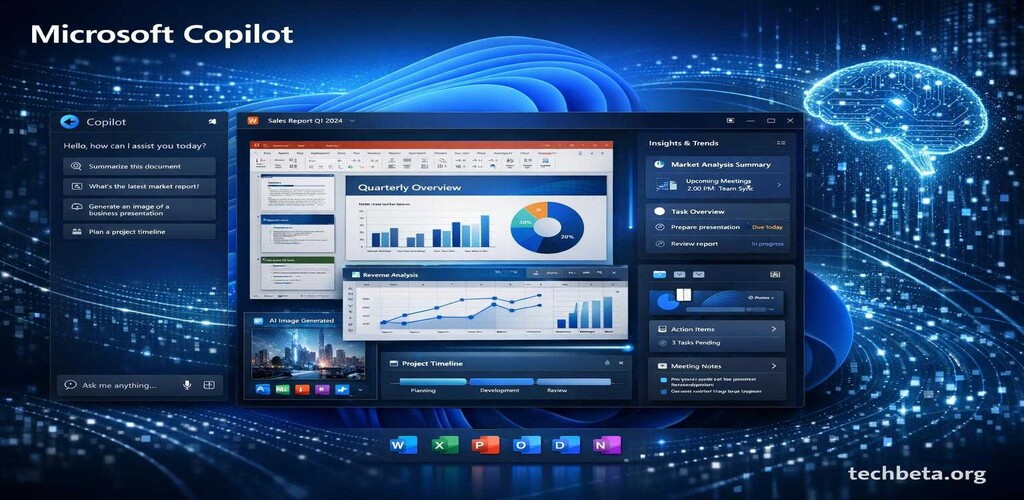
Microsoft has announced a significant expansion of its Copilot AI assistant, bringing deeper integration across Windows 11 and the entire Microsoft 365 suite. The update, rolling out globally this week, represents one of the largest AI deployments in enterprise software history and marks a pivotal moment in how millions of users will interact with their computers and productivity applications.
The technology giant has been steadily building toward this moment since first introducing Copilot features in early 2024. Now, with this comprehensive update, Microsoft is delivering on its promise to make AI assistance available at every level of the computing experience, from system-level operations to complex document creation and analysis.
Key Features in the Latest Update
The new Copilot integration introduces several groundbreaking capabilities that promise to transform how users interact with their computers and productivity applications. These features have been developed based on extensive user feedback and represent significant advances in AI-assisted computing.
System-Wide AI Commands
Users can now invoke Copilot from any application using a universal keyboard shortcut (Windows key + C), allowing for context-aware assistance regardless of what program is currently active. This means you can be working in a third-party application and still access Copilot’s capabilities without switching windows or breaking your workflow.
The system-wide integration extends beyond simple queries. Copilot can now understand the context of what you are working on across multiple applications simultaneously. For example, if you are researching a topic in your browser while taking notes in OneNote, Copilot can synthesize information from both sources to provide more relevant assistance.
Enhanced Document Analysis
In Word and Excel, Copilot can now analyze entire document libraries, providing summaries and insights across multiple files simultaneously. This feature is particularly valuable for professionals who need to review large volumes of documents quickly, such as lawyers reviewing case files or analysts examining financial reports.
The document analysis capabilities include automatic identification of key themes across documents, contradiction detection between different sources, and the ability to generate comprehensive summaries that highlight the most important information. Users can also ask specific questions about their document collections and receive answers with citations pointing to the relevant source documents.
Real-Time Meeting Transcription
Teams meetings now feature improved AI transcription with automatic action item extraction and follow-up email drafting. The system can distinguish between different speakers with greater accuracy and can identify when decisions are made or tasks are assigned during conversations.
After meetings conclude, Copilot automatically generates a structured summary that includes key discussion points, decisions made, action items with assigned owners, and suggested follow-up dates. Users can review and edit these summaries before sharing them with meeting participants, ensuring accuracy while saving significant time on post-meeting documentation.
Code Generation in Visual Studio
Developers receive more accurate code suggestions with better understanding of project context and coding standards. The improved Copilot for developers can analyze entire codebases to understand architectural patterns, naming conventions, and coding styles used throughout a project.
New features include automatic documentation generation, test case suggestions based on code coverage analysis, and intelligent refactoring recommendations. The system can also identify potential security vulnerabilities and suggest fixes before code is committed to repositories.
Enterprise Security Enhancements
Microsoft has addressed enterprise security concerns with comprehensive new data protection features that have been developed in consultation with security experts and enterprise customers. Understanding that AI systems handling sensitive corporate data require robust security measures, Microsoft has implemented multiple layers of protection.
All Copilot interactions now include end-to-end encryption, ensuring that queries and responses cannot be intercepted or accessed by unauthorized parties. The encryption extends to data in transit and at rest, providing comprehensive protection throughout the AI processing pipeline.
Administrators can set granular permissions controlling which data sources the AI can access. This means organizations can allow Copilot to access certain document libraries while restricting access to more sensitive repositories. The permission system integrates with existing Microsoft 365 security groups and compliance labels, making it easy to implement policies that align with existing data governance frameworks.
“We have built Copilot with enterprise security as a foundational principle,” said Satya Nadella, Microsoft CEO, during the announcement event. “Organizations can confidently deploy these AI capabilities knowing their sensitive data remains protected. We understand that trust is earned, and we are committed to maintaining the highest standards of data protection.”
Additional security features include comprehensive audit logging that tracks all Copilot interactions, data loss prevention integration that prevents sensitive information from being inadvertently shared through AI responses, and compliance tools that help organizations meet regulatory requirements in industries such as healthcare and financial services.
Performance Improvements and Technical Architecture
Behind the scenes, Microsoft has made significant investments in the technical infrastructure powering Copilot. The system now utilizes a distributed architecture that processes requests across multiple data centers, reducing latency and improving response times for users worldwide.
Response times have been reduced by approximately 40% compared to the previous version, with most queries now receiving responses in under two seconds. This improvement is particularly noticeable for complex requests that require analyzing large documents or searching across multiple data sources.
The underlying language models have also been updated, with Microsoft incorporating advances from its partnership with OpenAI as well as proprietary improvements developed by Microsoft Research. These updates improve accuracy across a wide range of tasks and reduce the likelihood of incorrect or irrelevant responses.
Availability and Pricing
The enhanced Copilot features are available immediately for Microsoft 365 Business and Enterprise subscribers. The rollout will occur in phases, with North American and European users receiving access first, followed by other regions over the coming weeks.
Windows 11 users will receive the system-level integration through Windows Update over the coming weeks. Users running Windows 11 version 23H2 or later will automatically receive the update, while those on older versions may need to update their operating system first.
Microsoft has also announced a new Copilot Pro tier offering additional features for power users at $20 per month. This tier includes priority access to new features, higher usage limits for AI-generated content, and access to advanced capabilities such as custom AI model fine-tuning for specific use cases.
For enterprise customers, Microsoft is offering volume licensing options that provide cost savings for large deployments. Organizations deploying Copilot to more than 500 users can contact Microsoft sales representatives to discuss custom pricing arrangements.
Training and Adoption Resources
Recognizing that new technology requires proper training for effective adoption, Microsoft is launching a comprehensive education program alongside the Copilot update. The program includes self-paced online courses, live webinars led by Microsoft experts, and certification programs for IT professionals.
The Microsoft Learn platform now features an expanded Copilot learning path that covers everything from basic usage to advanced administration topics. Organizations can also request customized training sessions tailored to their specific use cases and industry requirements.
Microsoft partners are being equipped with training materials and demonstration environments to help their customers implement Copilot effectively. This partner ecosystem ensures that organizations of all sizes have access to expert guidance during their AI adoption journey.
Industry Impact and Analyst Perspectives
Industry analysts predict this update will accelerate AI adoption in enterprise environments significantly. According to Gartner, organizations using AI-powered productivity tools report an average 25% increase in employee efficiency for routine tasks, with some organizations seeing even greater improvements in specific use cases.
“Microsoft is setting the standard for enterprise AI integration,” said Mary Branscombe, technology analyst at IDC. “The depth of integration across the Microsoft 365 ecosystem gives them a significant advantage over competitors who offer more fragmented AI solutions.”
The update positions Microsoft competitively against Google Workspace with Gemini and other AI-enhanced productivity suites entering the market. While Google has made significant strides with its own AI integration, Microsoft’s deeper integration with desktop operating systems and enterprise infrastructure provides advantages that are difficult for competitors to match quickly.
Customer Early Adopter Experiences
Several organizations that participated in the early access program have shared their experiences with the new Copilot capabilities. Accounting firm Deloitte reported that their consultants saved an average of 5 hours per week on document preparation and analysis tasks after implementing Copilot.
Healthcare provider Kaiser Permanente found that Copilot’s meeting transcription and summarization features significantly reduced the administrative burden on clinical staff, allowing them to spend more time on patient care. The organization emphasized the importance of the security features in enabling AI adoption in their highly regulated environment.
Small business owner Jennifer Martinez, who runs a marketing agency with 15 employees, described Copilot as “transformative” for her team’s productivity. “We are producing higher quality work in less time,” she said. “The ability to quickly analyze competitor content and generate initial drafts has changed how we approach client projects.”
Looking Ahead: The Future of AI-Assisted Computing
As the AI assistant landscape continues to evolve, users can expect increasingly sophisticated integrations throughout 2025 and beyond. Microsoft has indicated that future updates will include expanded language support, improved handling of specialized industry terminology, and deeper integration with third-party applications through an expanded API ecosystem.
The company is also investing in research to make AI assistants more proactive, anticipating user needs rather than simply responding to explicit requests. This vision of ambient AI assistance represents the next frontier in productivity software, and Microsoft’s substantial head start in enterprise deployment positions them well to lead this evolution.
For organizations considering AI adoption, the message from this update is clear: AI-assisted productivity tools have matured to the point where they can deliver meaningful value for a wide range of use cases. The question is no longer whether to adopt these technologies, but how quickly organizations can implement them effectively while maintaining appropriate governance and security controls.