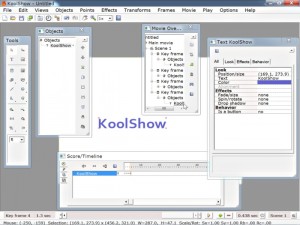
KoolShow
What is KoolShow?
KoolShow is an HTML5-based multimedia presentation and animation software developed by Lucky Monkey Designs LLC, designed to create interactive web pages, slideshows, and animated presentations without requiring advanced coding knowledge. This Windows application enables users to combine text, images, vector shapes, audio, and video into rich interactive content using the HTML5 canvas technology. Unlike traditional presentation tools like PowerPoint, KoolShow focuses on creating web-ready presentations with navigation buttons, motion effects, and multimedia integration that can be embedded directly into websites or shared online. The software targets web designers, educators, marketers, and content creators who need to produce engaging visual content optimized for modern web browsers.
Key Features
HTML5 Canvas Output: Create presentations and animations that run natively in web browsers without requiring Flash or additional plugins, ensuring compatibility across devices.
Rich Drawing Tools: Access comprehensive vector drawing capabilities to create shapes, lines, and custom graphics directly within the application.
Advanced Text Effects: Apply text morphing, animation paths, and 3D text effects to create eye-catching typography for presentations.
SVG File Support: Import and edit Scalable Vector Graphics files, preserving quality at any resolution for professional-looking presentations.
Motion Script Engine: Utilize the extended HTML5 Motion Script engine with masking effects and multiple image/shape animation options for sophisticated motion graphics.
Google Web Fonts: Access and integrate Google’s extensive font library directly into your presentations for typography that matches modern web design standards.
Multiple Export Formats: Output projects as HTML5, AVI, MP4, and GIF formats, providing flexibility for different distribution channels and platforms.
Audio Synchronization: Sync animations perfectly with audio tracks for creating narrated presentations and explainer videos.
Pre-designed Components: Leverage a comprehensive library of templates, buttons, and navigation elements to accelerate project development.
What’s New in KoolShow
Version 2.5.6 introduces expanded Motion Script capabilities with four additional image and shape animation effects for more dynamic presentations. The masking system has been enhanced to provide more precise control over revealing and hiding content. Google Web Fonts integration allows instant access to hundreds of professional typefaces without manual font installation. Export performance has been optimized, particularly when generating MP4 and HTML5 canvas output. The interface includes improved timeline controls for more accurate animation timing. Memory management enhancements allow working with larger multimedia projects without performance degradation. Bug fixes address issues with SVG import and audio synchronization timing in previous versions.
System Requirements
Operating System: Windows 10, Windows 8, Windows 7, or Windows Vista
Processor: 1 GHz or faster processor
Memory: 1 GB RAM minimum (2 GB recommended for complex projects)
Storage: 50 MB for installation plus project storage space
Graphics: DirectX compatible display adapter with 1024×768 resolution
Browser: Modern web browser for previewing HTML5 output (Chrome, Firefox, Edge)
Additional: Internet connection for Google Web Fonts and software updates
Download Guide
Visit the official KoolMoves website at www.koolmoves.com where KoolShow is available for download alongside its sibling product KoolMoves. Navigate to the KoolShow product page and click the Download button to save the 10.6 MB installer file. Run the downloaded executable and follow the installation wizard instructions to complete setup on your Windows system. After installation, launch KoolShow to explore the interface and template library. The software offers a trial period allowing you to test all features before purchasing a license. Start with one of the pre-designed templates to understand the workflow, then experiment with importing your own images, audio, and video files. Online tutorials and documentation are available on the Lucky Monkey Designs website to help you master advanced features.
KoolShow vs Alternatives
vs Microsoft PowerPoint: PowerPoint excels at traditional slide presentations with extensive template libraries and corporate integration, while KoolShow specializes in web-based HTML5 animations with motion graphics capabilities unavailable in PowerPoint.
vs Adobe Animate: Animate offers professional-grade animation tools with timeline editing and advanced drawing features, but requires a subscription and has a steeper learning curve compared to KoolShow’s more accessible interface.
vs Prezi: Prezi provides cloud-based zooming presentations with unique non-linear navigation, while KoolShow focuses on locally-created HTML5 content with more control over animation details and export formats.
vs Google Slides: Google Slides offers free cloud collaboration and easy sharing, but lacks the advanced animation effects, HTML5 canvas capabilities, and multimedia synchronization features found in KoolShow.
Pros and Cons
Pros:
- HTML5 output ensures cross-platform browser compatibility
- No Flash dependency for modern web presentation needs
- Multiple export formats including video options
- Integrated drawing tools eliminate need for separate graphics software
- Audio synchronization for narrated content
- SVG support for scalable vector graphics
- Google Web Fonts integration for professional typography
- Lightweight installation footprint at only 10.6 MB
Cons:
- Windows-only platform excludes Mac and Linux users
- Smaller user community than mainstream alternatives
- Limited third-party resources and templates
- Interface feels dated compared to modern design tools
- Learning curve for Motion Script features
- No cloud storage or collaboration features
- Less polished than subscription-based professional tools
Who Should Use KoolShow?
Web designers creating interactive website elements will benefit from the HTML5 canvas output and easy web integration. Small business owners developing marketing presentations without design budgets can leverage the pre-built components and templates. Educators producing engaging online learning materials will appreciate the multimedia synchronization and animation capabilities. Independent content creators making explainer videos for YouTube or social media can utilize the video export options. Freelancers offering presentation design services gain a cost-effective alternative to subscription-based professional tools. Marketing professionals creating landing page animations and product demonstrations will value the motion effects and interactive navigation features. Anyone seeking to move away from Flash-based presentations to modern HTML5 technology will find KoolShow a practical migration path.
Frequently Asked Questions
Does KoolShow require Flash Player?
No, KoolShow creates HTML5-based presentations that run natively in modern web browsers without requiring Flash or any plugins.
Can I export presentations as video files?
Yes, KoolShow can export projects as AVI and MP4 video formats, in addition to HTML5, and animated GIF files.
Is KoolShow available for Mac?
No, KoolShow is exclusively for Windows operating systems. Mac users would need virtualization software or a Windows partition to run it.
What’s the difference between KoolShow and KoolMoves?
KoolMoves is the more advanced version with additional animation features and professional tools, while KoolShow focuses specifically on presentation creation with a simpler interface.
Can I collaborate with others on projects?
KoolShow is a desktop application without built-in collaboration features. Projects would need to be shared manually via file transfer.
Does it support responsive design for mobile devices?
The HTML5 output can be made responsive with appropriate coding, but the software doesn’t automatically generate responsive layouts.
Final Verdict
KoolShow serves a specific niche for Windows users seeking an affordable, one-time purchase solution for creating HTML5-based presentations and web animations. The software’s strength lies in its ability to produce web-ready interactive content without requiring Flash, making it relevant for modern web development needs. While it lacks the polish and extensive feature sets of subscription-based professional tools like Adobe Animate, KoolShow provides sufficient capabilities for small businesses, educators, and freelancers who need to create engaging multimedia presentations without ongoing costs. The audio synchronization and multiple export formats add versatility beyond basic presentation software. However, the Windows-only limitation and dated interface may deter some users. For those specifically needing HTML5 canvas presentations or seeking to transition legacy Flash content to modern standards, KoolShow represents a practical and economical choice.
Developer:
KoolShow
Download Options
Download KoolShow
Download NowSafe & Secure
Verified and scanned for viruses
Regular Updates
Always get the latest version
24/7 Support
Help available when you need it
Pros & Cons Analysis
Pros
- Real-time protection against malware and viruses
- Regular security updates and definitions
- User-friendly interface
- Low system resource usage
- Automatic scanning features
Cons
- May slow down system during full scans
- Occasional false positives
- Requires regular updates
- Some features may require premium version
System Requirements
- Windows 7 or later / macOS 10.12 or later
- 2 GB RAM minimum
- 500 MB available disk space
- Internet connection for updates