Bixelangelo
What is Bixelangelo?
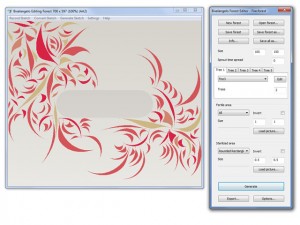
Bixelangelo is a specialized vector drawing and animation software developed by Outerspace Software, designed primarily for creating 2D and 3D curves, paths, and animated elements for use in BluffTitler, a professional 3D video titling application. This Windows desktop tool enables designers and video creators to craft intricate logos, handwritten text animations, flight paths, roller coaster simulations, and tunnel effects through an intuitive drawing interface. Unlike traditional pixel art or raster graphics programs, Bixelangelo works with vector-based paths that can be traced, recorded, and exported as EPS files for seamless integration with BluffTitler projects. The software features a unique recording capability that captures your drawing motions in real-time, creating smooth animations from freehand sketches.
Key Features
Drawing Recording: Capture your drawing process in real-time with one-click recording, transforming freehand sketches into animated paths perfect for video introductions and title sequences.
Image Tracing: Import reference images in BMP, JPG, GIF, TIFF, and PNG formats to manually trace over them, creating precise vector paths from existing artwork.
Roller Coaster Elements: Access 14 pre-built roller coaster components including straight lines, lift hills, pre-drops, dives, hills, turns, circular loops, clothoid loops, dive loops, top hats, corkscrews, cobra rolls, batwings, and hammerhead turns for creating dynamic 3D path animations.
Vector Editing: Create and modify scalable vector paths that maintain quality at any resolution, ideal for professional video production workflows.
EPS Export: Output drawings as EPS files compatible with BluffTitler’s EPS and Sketch layers for seamless integration into 3D video projects.
Sketch Map Saving: Save recorded drawings as sketch maps for later refinement or reuse across multiple projects.
Flight Path Creation: Design complex camera movements and object trajectories for cinematic video effects and smooth animations.
Tunnel Generation: Build intricate tunnel structures for immersive visual effects in 3D presentations and video content.
What’s New in Bixelangelo
Version 5.3.1.0 introduces enhanced compatibility with the latest BluffTitler releases, ensuring smooth workflow integration. The drawing engine has been optimized for better performance with complex paths containing thousands of points. New roller coaster elements include additional loop variations and banking controls for more realistic track designs. The image tracing feature now supports higher resolution inputs up to 4K, providing more detailed reference material for precision work. Export functionality has been streamlined with faster EPS file generation and improved path optimization. The interface includes refined zoom controls and better canvas navigation for working on intricate details. Memory management improvements allow handling larger projects without performance degradation.
System Requirements
Operating System: Microsoft Windows 7, Windows 8, Windows 10, or Windows 11 (64-bit)
Graphics Card: DirectX 11 compatible graphics adapter
Hard Disk Space: 4 MB available storage for installation
Additional Software: BluffTitler version 14.0 or higher (for utilizing created files)
Memory: 2 GB RAM minimum (4 GB recommended)
Processor: 1 GHz or faster processor
Display: 1024×768 minimum screen resolution
Download Guide
Visit the official Outerspace Software website at www.outerspace-software.com to access the Bixelangelo download page. Click the download link to save the installer to your computer. Run the setup executable and follow the installation wizard prompts. The software requires BluffTitler version 14.0 or higher to utilize the created EPS files, so ensure you have BluffTitler installed for complete functionality. After installation, launch Bixelangelo and explore the built-in templates and roller coaster elements. The manual is available online at the Outerspace Software website, providing detailed instructions for all features. Try the drawing recording feature by clicking the record button and sketching freely to see how your motions are captured as animated paths.
Bixelangelo vs Alternatives
vs Adobe Illustrator: Illustrator offers comprehensive vector editing with extensive tools and industry-standard compatibility, but Bixelangelo specializes in animation path creation specifically for BluffTitler integration at a fraction of the cost.
vs Inkscape: Inkscape is free and open-source with powerful vector capabilities, but lacks Bixelangelo’s recording feature and specialized roller coaster elements designed for 3D video animation workflows.
vs CorelDRAW: CorelDRAW provides professional vector design with advanced typography and layout tools, while Bixelangelo focuses narrowly on creating animated paths and 3D curves for video titling applications.
vs Synfig Studio: Synfig is a free 2D animation software with timeline-based animation, but Bixelangelo’s strength lies in creating paths for BluffTitler rather than standalone 2D animations.
Pros and Cons
Pros:
- Unique drawing recording feature for animated path creation
- Specialized roller coaster elements save time on complex paths
- Seamless integration with BluffTitler workflow
- Small installation footprint at only 4 MB
- Image tracing with support for multiple formats
- Lightweight software with minimal system requirements
- Vector-based output maintains quality at any scale
- Straightforward interface focused on specific tasks
Cons:
- Limited usefulness without BluffTitler software
- Narrow feature set compared to general vector editors
- Windows-only platform excludes Mac and Linux users
- Requires DirectX 11 compatible graphics hardware
- Less versatile than standalone animation software
- Limited documentation compared to mainstream alternatives
- Specialized tool not suitable for general graphic design
Who Should Use Bixelangelo?
BluffTitler users creating 3D video titles and presentations will find Bixelangelo essential for generating animated paths and complex curves. Video producers working on professional broadcast graphics benefit from the roller coaster elements and flight path capabilities for dynamic camera movements. Motion graphics designers integrating hand-drawn elements into 3D compositions will appreciate the drawing recording feature. Content creators producing YouTube intros and outros can leverage the software to add animated text effects and logo reveals. Educators and students learning 3D video production gain hands-on experience with path-based animation. Corporate presentation designers creating engaging visual content will value the ability to trace company logos and transform them into animated 3D elements for impactful business communications.
Frequently Asked Questions
Can I use Bixelangelo without BluffTitler?
While you can create and export EPS files, Bixelangelo is specifically designed for BluffTitler integration. The files are optimized for use in BluffTitler’s EPS and Sketch layers.
Does it work on Mac or Linux?
No, Bixelangelo is exclusively for Windows operating systems (Windows 7 and newer, 64-bit versions).
What file formats can I import for tracing?
You can import BMP, JPG, GIF, TIFF, and PNG image files as reference material for manual tracing.
Is it suitable for pixel art creation?
No, Bixelangelo creates vector paths, not pixel art. It’s designed for 3D video path animation rather than pixel-based artwork.
How much does Bixelangelo cost?
Pricing information is available on the official Outerspace Software website. It’s commercial software typically bundled or sold alongside BluffTitler.
Can I create standalone animations?
Bixelangelo creates paths and curves for use in BluffTitler. For standalone animations, you’d need to export to BluffTitler and render the final video there.
Final Verdict
Bixelangelo excels as a specialized companion tool for BluffTitler users who need to create animated paths, complex curves, and dynamic 3D trajectories for video titles and presentations. The drawing recording feature uniquely captures freehand sketches as animated paths, offering creative possibilities unavailable in general vector editors. The roller coaster elements and flight path tools demonstrate thoughtful design for motion graphics workflows. However, the software’s value is almost entirely dependent on owning BluffTitler, making it a niche solution rather than a standalone graphics tool. For BluffTitler users, Bixelangelo is an invaluable asset that significantly expands creative capabilities and streamlines the process of adding animated vector elements to 3D video projects. Those not invested in the BluffTitler ecosystem should explore more versatile vector or animation alternatives.
Developer:
Bixelangelo
Download Options
Download Bixelangelo
Download NowSafe & Secure
Verified and scanned for viruses
Regular Updates
Always get the latest version
24/7 Support
Help available when you need it
Pros & Cons Analysis
Pros
- Real-time protection against malware and viruses
- Regular security updates and definitions
- User-friendly interface
- Low system resource usage
- Automatic scanning features
Cons
- May slow down system during full scans
- Occasional false positives
- Requires regular updates
- Some features may require premium version
System Requirements
- Windows 7 or later / macOS 10.12 or later
- 2 GB RAM minimum
- 500 MB available disk space
- Internet connection for updates