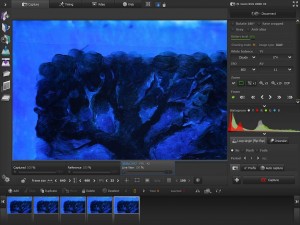
AnimaShooter Capture
What is AnimaShooter Capture?
AnimaShooter Capture is entry-level stop-motion animation software developed by Animation Technologies LTD, designed to make frame-by-frame animation accessible to beginners and hobbyists. This Windows application enables users to create professional-looking stop-motion videos using webcams or Canon DSLR cameras with Live View support. Unlike its advanced sibling AnimaShooter Pioneer, Capture focuses on core animation features while maintaining an intuitive interface perfect for those new to stop-motion. The software supports action figures, clay animation, drawings, and various other stop-motion techniques, providing essential tools for capturing and exporting animation projects.
Key Features
Onion Skinning: Overlay previous and next frames transparently to track motion progress and ensure smooth animation transitions between shots.
Canon DSLR Support: Control shutter speed, aperture, white balance, and ISO directly from the software when using compatible Canon cameras with Live View.
Automatic X-Sheet Generation: Dope sheets update automatically as you capture frames, helping organize and document your animation timeline.
Time-Lapse Mode: Set automated capture intervals for creating time-lapse sequences without manually triggering each frame.
RAM Preview: Quickly preview your animation sequences in real-time using system memory for immediate feedback.
Anti-Flicker Effect: Reduce lighting inconsistencies between frames with built-in anti-flicker video processing.
Audio Import: Synchronize your animation with dialogue or sound effects by importing and editing audio tracks.
Chroma Key Preview: Test green screen removal in real-time to composite stop-motion elements with other backgrounds.
Multiple Export Formats: Output as WebM, OGV, AVI, or uncompressed video, plus export frame sequences as PNG, JPG, TIFF, or WebP images.
What’s New in AnimaShooter Capture
Version 3.9.7.8 brings enhanced stability and improved camera compatibility. The interface now features better frame navigation controls and a more responsive timeline. Export performance has been optimized for faster rendering times, particularly when outputting HD video. The anti-flicker algorithm has been refined to produce smoother results with fewer artifacts. New webcam support includes modern high-resolution models like the Logitech BRIO. RGB histogram accuracy has improved for better exposure monitoring. Project loading times have been reduced, and memory management is more efficient when working with lengthy animation sequences.
System Requirements
Operating System: Windows 11, Windows 10, or Windows 8.1
Processor: Intel Core i3 or above (Intel Pentium 4 minimum)
Memory: 2 GB RAM minimum (4 GB recommended)
Storage: 200 MB free space for installation plus project storage
Camera: Compatible webcam or Canon DSLR with Live View support
Graphics: DirectX compatible display adapter
Additional: USB port for camera connection, internet for activation
Download Guide
Visit the official AnimaShooter website at www.animashooter.com and locate the AnimaShooter Capture download section. Click the Download button to save the installer executable to your computer. Run the downloaded file and follow the installation wizard through the setup process. The software offers many features completely free forever, including project saving, webcam frame capture, sequence editing and export, filters including chroma key preview, and video import capabilities. Connect your webcam or Canon DSLR camera after installation. Launch AnimaShooter Capture and the program will automatically detect compatible devices. Access the built-in tutorials and documentation to learn the basics of stop-motion animation workflow.
AnimaShooter Capture vs Alternatives
vs AnimaShooter Pioneer: Pioneer includes advanced features like comprehensive exposure sheet export, more camera options, and professional-grade tools, while Capture provides the essential features at a lower price point with many capabilities free forever.
vs Stop Motion Studio: Stop Motion Studio offers mobile app versions for iOS and Android with cloud sync, while AnimaShooter Capture is Windows-only but provides more professional export options and Canon DSLR support.
vs MonkeyJam: MonkeyJam is completely free and open-source but lacks modern updates and camera support. AnimaShooter Capture offers active development and contemporary features with a generous free tier.
vs Frames: Frames focuses on simplicity with minimal features, ideal for absolute beginners. AnimaShooter Capture provides more professional tools like audio sync and anti-flicker effects while remaining user-friendly.
Pros and Cons
Pros:
- Many essential features available completely free forever
- Beginner-friendly interface with intuitive controls
- Canon DSLR support with manual camera control
- Built-in audio synchronization capabilities
- Anti-flicker effect for professional-looking results
- Multiple export formats including modern WebM and WebP
- Active development with regular updates
- Lower system requirements than professional alternatives
Cons:
- Windows-only platform limits Mac and Linux users
- Limited advanced features compared to Pioneer version
- Camera support primarily Canon DSLRs, fewer brand options
- Basic audio editing compared to dedicated video editors
- No cross-platform project compatibility
- Documentation less comprehensive than premium software
Who Should Use AnimaShooter Capture?
Beginning animators exploring stop-motion for the first time will benefit from the free forever features and gentle learning curve. Students working on school animation projects can access professional tools without budget constraints. Hobbyists creating YouTube content or social media videos will appreciate the modern export formats optimized for web sharing. Parents helping children create stop-motion movies can use the simplified interface for family projects. Amateur filmmakers integrating stop-motion sequences into larger productions will find the chroma key and audio sync features valuable. Budget-conscious creators who need reliable software without ongoing subscription costs should consider the generous free tier before potentially upgrading to Pioneer for advanced needs.
Frequently Asked Questions
Is AnimaShooter Capture completely free?
Many core features including project saving, webcam capture, editing, export, and filters are free forever. Some advanced features require a paid license.
What’s the difference between Capture and Pioneer?
Capture is the entry-level version with essential stop-motion tools and many free features. Pioneer adds professional capabilities like advanced exposure sheets, more camera options, and enhanced export features.
Can I use my smartphone camera?
No, AnimaShooter Capture works with webcams and Canon DSLRs connected via USB. Smartphone cameras aren’t directly supported.
Does it work on Mac or Linux?
AnimaShooter Capture is Windows-only (Windows 8.1 and newer). It’s not available for Mac or Linux due to technical limitations.
Can I add sound effects?
Yes, you can import and edit audio tracks to synchronize with your animation, though advanced audio editing should be done in dedicated software.
Is there a frame capture limit?
No, both free and paid versions allow unlimited frame capture for projects of any length.
Final Verdict
AnimaShooter Capture stands out as an excellent entry point into stop-motion animation, offering a remarkable amount of functionality at no cost. The generous free tier provides everything beginners need to learn animation fundamentals and create complete projects without financial investment. While it lacks some advanced features found in Pioneer or premium alternatives like Dragonframe, the core toolset is surprisingly robust with onion skinning, audio sync, anti-flicker effects, and professional export options. The Canon DSLR support elevates it above basic webcam-only solutions, allowing quality-conscious creators to produce impressive results. For Windows users starting their stop-motion journey or hobbyists working on personal projects, AnimaShooter Capture delivers exceptional value and capability that makes professional animation techniques accessible to everyone.
Developer:
AnimaShooter Capture
Download Options
Download AnimaShooter Capture
Download NowSafe & Secure
Verified and scanned for viruses
Regular Updates
Always get the latest version
24/7 Support
Help available when you need it
Pros & Cons Analysis
Pros
- Real-time protection against malware and viruses
- Regular security updates and definitions
- User-friendly interface
- Low system resource usage
- Automatic scanning features
Cons
- May slow down system during full scans
- Occasional false positives
- Requires regular updates
- Some features may require premium version
System Requirements
- Windows 7 or later / macOS 10.12 or later
- 2 GB RAM minimum
- 500 MB available disk space
- Internet connection for updates