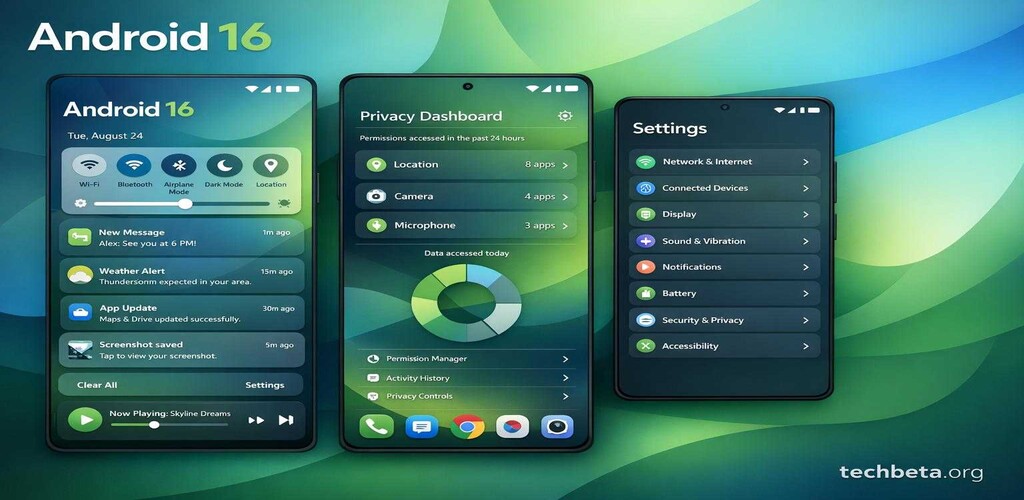
Google has released the first developer preview of Android 16, codenamed “Baklava,” showcasing a completely redesigned notification system and comprehensive privacy enhancements that represent the most significant changes to the mobile operating system in several years. The preview gives developers and enthusiasts an early look at features expected to reach consumers later this year.
This release marks an important milestone in Android’s evolution, as Google addresses longstanding user feedback about notification management while significantly strengthening privacy controls. The changes reflect Google’s recognition that smartphones have become central to daily life and that users need more sophisticated tools for managing the constant flow of digital information.
Redesigned Notification Experience
The most visible change in Android 16 is a completely overhauled notification system that reimagines how users interact with the steady stream of alerts, messages, and updates that modern smartphones generate. Google’s user research found that notification overload is one of the primary sources of smartphone stress, and Android 16 aims to address this comprehensively.
Smart Notification Grouping
AI-powered categorization automatically organizes notifications by context rather than just by app, grouping related messages across different applications. This means that a conversation that spans email, messaging apps, and social media can be grouped together, making it easier to follow discussions without switching between multiple notification categories.
The grouping system learns from user behavior over time, understanding which types of notifications users typically handle together and which they prefer to see separately. Users can also manually adjust grouping preferences, training the system to match their specific workflow.
The smart grouping extends to identifying notification threads, so multiple updates about the same topic or event are consolidated into expandable groups. For example, all notifications about a specific calendar event—reminders, location updates, and related messages—can be grouped together rather than appearing as separate items.
Priority Inbox
A new notification tier highlights messages requiring immediate attention while quietly collecting less urgent alerts. The Priority Inbox uses on-device machine learning to understand which notifications are most important to each user, considering factors such as sender relationship, content keywords, and historical response patterns.
Notifications identified as high priority appear prominently and can optionally override Do Not Disturb settings for truly urgent communications. Lower-priority notifications are still accessible but don’t demand immediate attention with sounds, vibrations, or prominent visual display.
Users maintain full control over the priority system, with the ability to manually mark senders or notification types as high or low priority. These manual adjustments help train the AI system while ensuring that important notifications are never missed.
Rich Notification Actions
Expanded inline actions allow users to complete more tasks without opening the source application. Notifications can now include more sophisticated interactive elements, including multi-step forms, selection lists, and even simple document previews.
For example, a delivery notification might include buttons to reschedule delivery, provide delivery instructions, or authorize leaving a package in a safe location—all without opening the delivery app. Calendar notifications can include quick rescheduling options that show available times directly in the notification shade.
Developers have access to a new notification API that supports these richer interactions, with templates and guidelines that ensure consistency across different applications. The system also includes privacy protections that limit what data can be included in notification previews.
Notification Summaries
Long notification threads can be summarized by on-device AI, providing quick overviews of lengthy conversations or multiple updates about the same topic. This feature is particularly valuable for group chats, email threads, and social media discussions that generate many individual notifications.
The summaries are generated entirely on-device, ensuring that notification content is not sent to cloud servers for processing. Users can expand summaries to see all individual notifications when they need full detail, but the summaries provide enough information to triage notifications quickly.
Privacy Dashboard 2.0
Android 16 introduces significant privacy improvements that build on the foundation established in previous versions while adding powerful new capabilities for users who want detailed insight into how their data is being used.
Weekly Privacy Reports
The enhanced Privacy Dashboard now provides a weekly privacy report, showing detailed breakdowns of how apps have accessed sensitive permissions over time. These reports include visualizations that make it easy to identify patterns and anomalies in app behavior.
The reports track access to location, camera, microphone, contacts, and other sensitive data categories. Users can see not just which apps accessed data, but when the access occurred, how frequently, and in some cases why (based on the app’s declared use case for the permission).
Unusual patterns are highlighted automatically. For example, if an app that previously accessed location occasionally suddenly begins checking location continuously, this change is flagged in the report. This helps users identify apps that may be behaving differently than expected.
Automatic Permission Revocation
Users can set automatic permission revocation for apps that have not been used within a customizable time period. This builds on Android’s existing permission auto-reset feature but provides more granular control and broader application.
The system can be configured to revoke permissions after periods ranging from one week to six months of inactivity, and users can specify different policies for different permission categories. For example, a user might allow apps to retain storage access for three months but revoke location access after just two weeks of non-use.
Before permissions are revoked, users receive notifications with the option to exempt specific apps or extend the grace period. This prevents surprises while encouraging regular review of app permissions.
Enhanced Permission Request Context
When apps request permissions, Android 16 provides more context about why the permission is needed and how it will be used. Apps that have registered with Google’s permission transparency program display verified descriptions of their data practices directly in permission dialogs.
“Privacy is not just a feature, it is a fundamental right,” said Sameer Samat, President of Android Ecosystem at Google, during the developer preview announcement. “Android 16 gives users unprecedented visibility and control over their personal data. We believe that transparency and user control are essential to building trust in the mobile ecosystem.”
Performance and Battery Improvements
Under the hood, Android 16 includes several optimizations that improve performance and extend battery life for all devices, not just the latest flagship hardware. These improvements are particularly noticeable on mid-range and older devices.
Improved App Launch Times
New memory management techniques reduce app cold start times by up to 20% compared to Android 15. Cold starts occur when an app is launched from scratch rather than resumed from memory, and they represent one of the most noticeable performance factors in daily smartphone use.
The improvements come from more intelligent memory management that keeps frequently-used apps in memory longer while more aggressively clearing apps that are unlikely to be needed soon. The system learns from user behavior to predict which apps should be prioritized in memory.
Background Task Scheduling
Improved background task scheduling extends battery life for typical usage patterns by batching background operations more efficiently. Apps that need to perform background work can now express preferences about when their tasks should run, allowing the system to schedule work during optimal times.
For example, a news app that needs to download new articles can indicate that the task is not time-sensitive, allowing the system to delay the download until the device is charging or connected to Wi-Fi. This reduces the frequency of radio wake-ups that consume significant battery power.
Thermal Management
Enhanced thermal management prevents performance throttling during extended use by more intelligently distributing workloads across processor cores and anticipating thermal buildup before it occurs. This is particularly valuable for gaming and other intensive applications that previously might cause devices to heat up and slow down.
The system can now communicate with apps about thermal conditions, allowing apps to adjust their behavior proactively. A game might reduce graphical detail slightly to prevent throttling rather than running at full quality until forced throttling degrades the experience more significantly.
Developer Features
Android 16 introduces numerous capabilities for app developers that enable new types of applications and improve the development experience. These features will ultimately benefit users through better apps and faster development cycles.
Foldable and Large-Screen Support
New APIs for foldable and large-screen devices make it easier to create apps that adapt intelligently to different screen configurations. The APIs abstract much of the complexity of supporting multiple screen sizes and folding states, allowing developers to focus on user experience rather than low-level implementation details.
Developers can now define how their apps should behave when devices fold or unfold, including smooth transitions between different layouts and intelligent content preservation across configuration changes. The system provides hooks that allow apps to anticipate fold events and prepare appropriate layouts in advance.
Satellite Connectivity Support
Improved support for satellite connectivity features enables apps to work with the emergency and basic communication capabilities that newer smartphones are beginning to offer. Developers can detect when satellite connectivity is available and design appropriate interfaces for the limited bandwidth and high latency of satellite communication.
Health and Fitness APIs
Enhanced health and fitness tracking APIs provide more detailed access to sensor data while maintaining appropriate privacy protections. Apps can access more granular activity data, improved sleep tracking signals, and new stress and wellness metrics from supported devices.
The health APIs include strong privacy controls, with all health data encrypted and accessible only with explicit user permission. Users can grant apps access to specific health data categories while denying access to others, maintaining control over sensitive personal information.
Wearable Device Integration
Better integration with wearable devices, particularly Wear OS watches, allows for smoother experiences that span multiple devices. Apps can more easily share state and transfer activities between phones and watches, and new APIs simplify the development of companion watch apps.
Timeline and Compatibility
The developer preview is currently available for Pixel 8 and newer devices, with support for additional devices expected as the preview program progresses. Google plans to release additional preview builds monthly, with each build addressing feedback from the developer community and adding additional features.
A public beta is expected in spring 2025, opening the preview program to general users who want early access to new features. The public beta typically occurs once the release is stable enough for daily use, though some bugs and missing features should still be expected.
The final release of Android 16 is targeted for the third quarter of 2025, with Pixel devices receiving the update first followed by other manufacturers according to their update schedules. Google has been working with major Android manufacturers to improve update timelines, and several have committed to delivering Android 16 updates within three months of the official release.
How to Participate in the Developer Preview
Developers interested in testing Android 16 can enroll their compatible devices through the Android Beta Program at google.com/android/beta. It is important to note that developer previews may contain bugs and are not recommended for primary devices that users depend on daily.
Backup all important data before installing preview builds, as some updates may require factory resets. Developer preview builds can typically be rolled back to stable releases, but this process also requires a factory reset and loss of locally stored data.
Developers are encouraged to test their apps on Android 16 early in the preview cycle to identify any compatibility issues. Google provides bug reporting tools and developer forums for reporting issues and getting assistance with preview-related problems. Early feedback from developers shapes the final release, so testing and reporting issues benefits the entire Android ecosystem.